Velocity Chart for Jira — Documentation
Sprint velocity on any Jira dashboard, with your own Definition of Done.
Quick start
- Install Velocity Chart from the Atlassian Marketplace.
- Open a Jira dashboard → Add gadget → search for Velocity Chart → Add.
- Click the gadget's pencil / Edit, tick a Scrum board with at least one closed sprint and click Save.
- Optional (Pro): choose which statuses count as done, how to estimate, and up to four boards. Click a sprint's bars to see the issues behind them.
On this page
Overview
Velocity Chart adds a sprint velocity chart to a Jira dashboard as a gadget. For each closed sprint of a Scrum board it shows committed (grey) and completed (green) work, a dashed line for the average and, in Pro, the say/do ratio.
- Works on company-managed and team-managed Scrum boards.
- You decide which statuses count as done (Pro).
- Estimate by Story Points, issue count or a custom numeric field (Pro).
- Click a sprint to see the issues behind its bars (Pro).
- Up to four boards in one gadget, and CSV and SVG export (Pro).
- Everyone sees only the issues they can open in Jira.
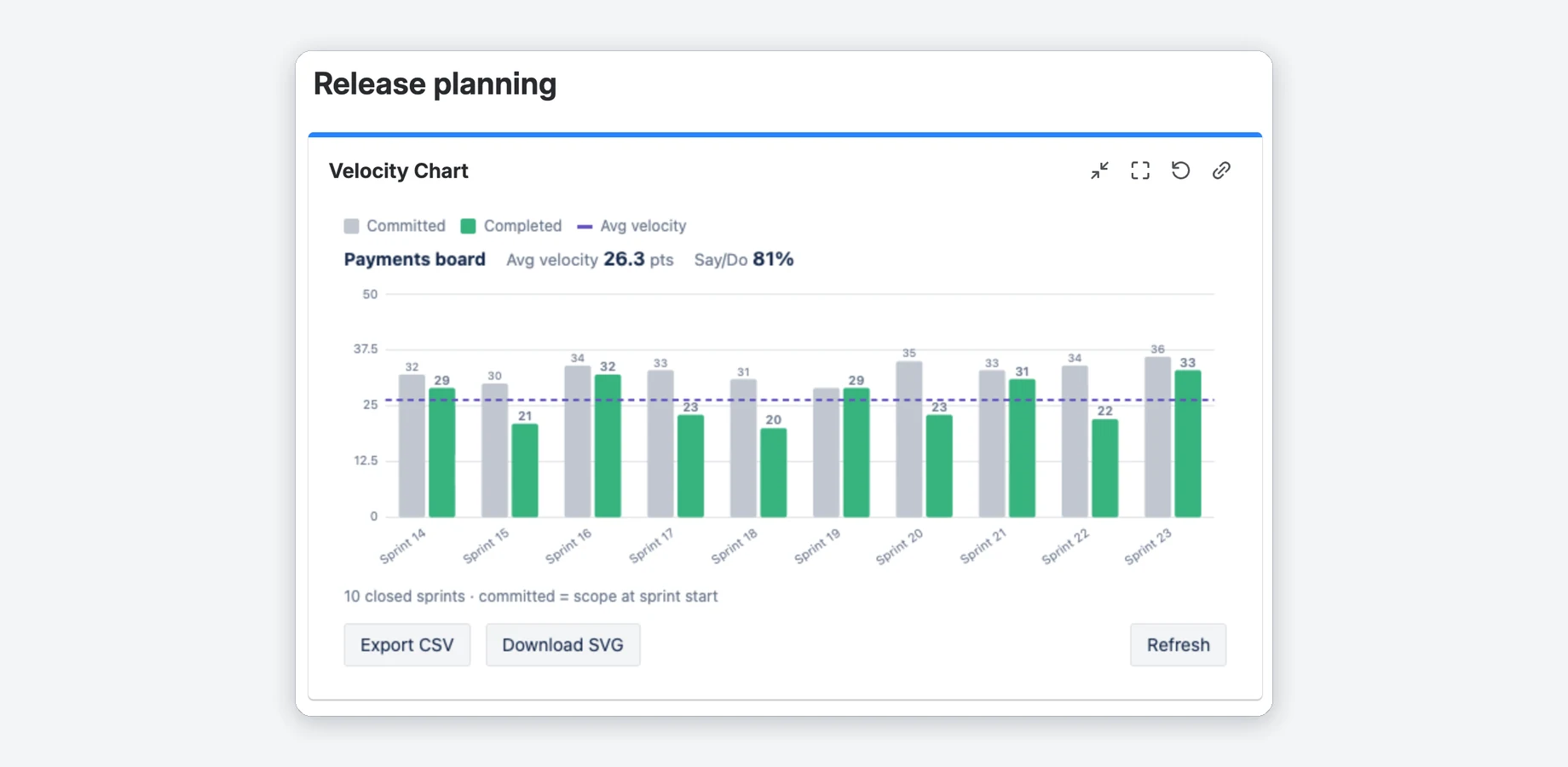
Add the gadget
The gadget needs a Scrum board with at least one closed sprint.
- Install Velocity Chart for Jira from the Marketplace (Get it now → your Jira site).
- Open a Jira Dashboard → Add gadget → search for Velocity Chart → Add.
- Click the gadget's pencil / Edit icon, tick a Scrum board and click Save.
What the two bars mean: How velocity is calculated.
Which boards are listed?
- Scrum boards, company- and team-managed, in projects you can browse in Jira; the picker reads the first 200 boards of the site. Team-managed boards are tagged “team-managed”.
- With more than 7 boards a search box filters by board name, project name or project key. Ticked boards stay visible while you search.
- Classic Kanban boards have no sprints and are not listed. A team-managed Kanban board may be listed but shows no closed sprints.
- New boards appear immediately; the picker is not cached.
Settings
Everything is set in the gadget's Edit view. Without Pro the gadget follows the board's own settings.
| Setting | What it does |
|---|---|
| Boards | The Scrum board to chart. PRO Tick up to 4 boards to compare. |
| Sprints to show | How many recent closed sprints to show (default 7). Free: 1–7, Pro: 1–20. |
| Sprint labels | Full name or Numbers only (the first number in the sprint name). Long names are shortened on the axis; hover a label for the full name. |
| Estimation PRO | Story Points (board default), Issue count or Custom numeric field. |
| Count as “Done” PRO | The statuses that count as completed. |
| Include sub-tasks PRO | Off by default. Turn it on to count sub-tasks too. |
Your Definition of Done PRO
Your Definition of Done decides what counts as completed. Tick the statuses your team calls done, for example Ready for release next to Done. Each status shows its status category in brackets.
- Pre-ticked are the statuses of your board's Done column. As long as you keep that selection, exactly these count, as in Jira's own velocity report.
- Once you change the selection, exactly the ticked statuses count.
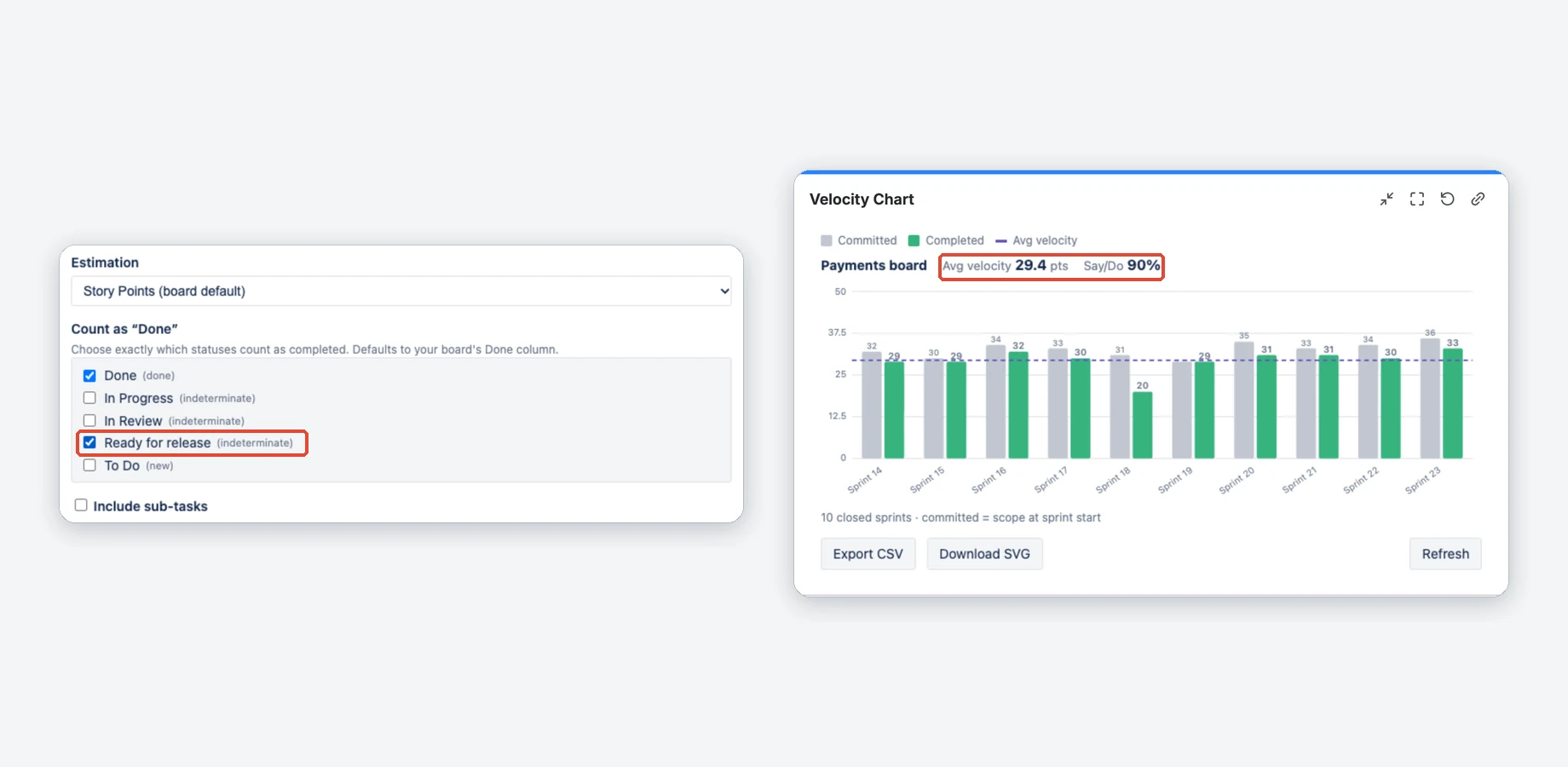
Before and after: the same board with two definitions
Done only (top: 26.3 points, 81% say/do) and Done plus Ready for release (bottom: 29.4 points, 90% say/do).
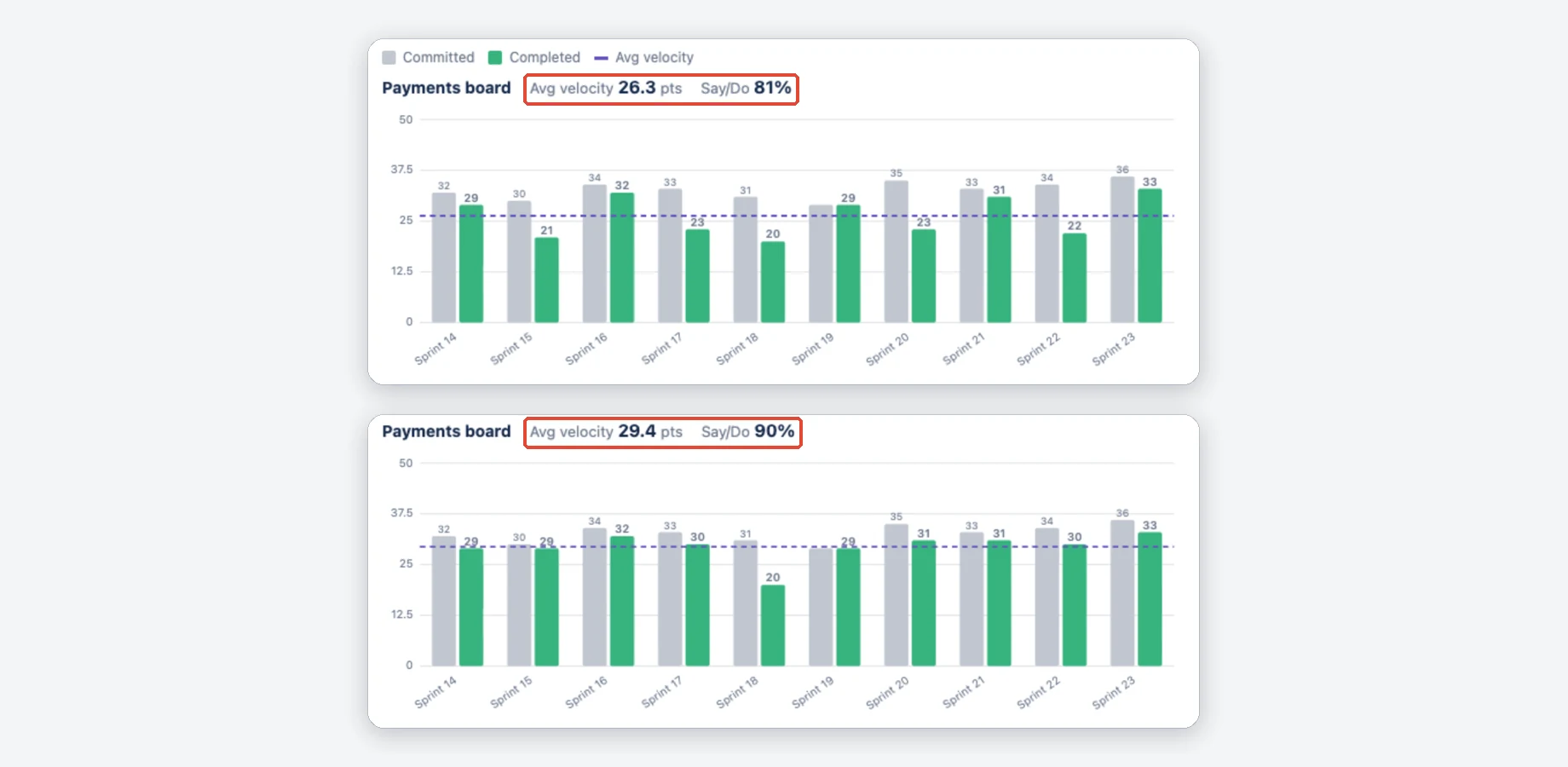
Estimation PRO
Story Points uses the board's own estimation field and falls back to the standard story points field if that one is empty. When this fallback supplies a counted estimate, a note under the chart names both fields and the sprints, because Jira's own velocity report counts 0 for those issues. Issue count counts every issue as 1. Custom numeric field lets you pick another numeric custom field.
More about estimation and sub-tasks
- Issues without a value count as 0, except with Issue count.
- Without Pro the gadget uses the board's setting: its estimation field, or the issue count when the board estimates by issue count.
- Sub-tasks are left out unless you tick Include sub-tasks.
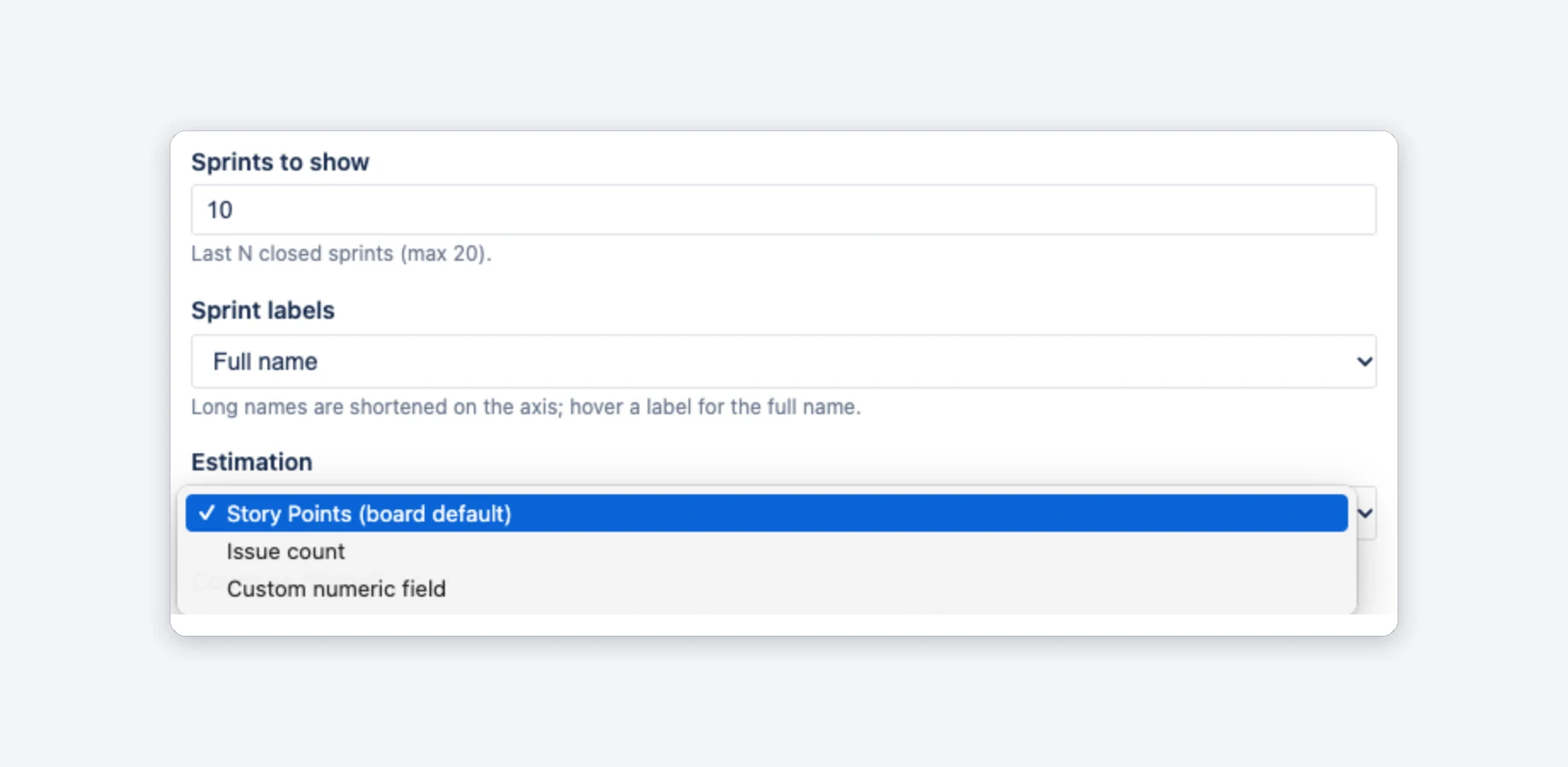
How velocity is calculated
Each closed sprint gets two bars. In short: grey is what the team took on at the start, green is what was done when the sprint closed.
- Committed (grey): the estimates of the issues that were in the sprint when it started and not yet done then, with the estimate they had at the start. The app reads this from each issue's sprint, status and estimate history. Issues added after the start do not count here.
- Completed (green): the estimates of the sprint's issues that were in a Done status when the sprint closed, by your Count as “Done” selection, with the estimate they had at the close. The app reads this from each issue's status history, as Jira's own velocity report does.
- Avg velocity (dashed line): the average velocity, that is the mean of the green bars over the sprints shown.
- Say/Do (Pro): completed ÷ committed for each sprint. Next to the board name is the average over the sprints that committed something; the values per sprint are in the CSV export.
Carried-over issues count as completed once. If an issue was not finished, moved to the next sprint and finished there, it counts as committed in both sprints but as completed only in the sprint in which it was finished. Jira keeps the closed sprint in the issue's Sprint field; the app looks at the status the issue had when that sprint closed. An issue reopened after the close still counts in the sprint in which it was done.
Issues that were already done when they joined a sprint count nowhere. If an issue was done when the sprint started, or when it was added later, and was not done again before the sprint closed, it is in neither bar, as in Jira's velocity report. The sprint details list it under “Completed outside of this sprint”. An issue that was done when it joined, reopened and done again before the close counts as completed only.
The numbers can still differ from Jira's own velocity report, for example when issues were removed from a sprint before it closed (Jira counts them as committed, the app cannot see them), when you count other statuses as done, when the board's estimation field is empty for some issues or when an issue security level hides issues from the app (details below).
More details and limits
- Issues added after the start count toward Completed when they are done, but not toward Committed. Say/do can therefore be above 100%. This also holds for issues created directly in the running sprint and for issues that were removed before the start and added again afterwards. An issue added within one second after the start still counts as committed.
- Issues removed from the sprint before it closed are not counted at all, so Committed is lower when scope was removed mid-sprint. Jira's own report counts them as committed, so this is a difference to it.
- “Done” means the same at the start, when an issue is added and at the close: your Count as “Done” statuses (Pro), otherwise the board's Done column.
- Later estimate changes do not rewrite past sprints: committed uses the estimate from the start of the sprint, completed the one from its close. If Jira cannot deliver the full history in time, the chart uses current values and says “could not read the full sprint history”; click Refresh.
- Sprints that several boards share: each board counts only the issues of its own saved filter. If Jira does not return the board's configuration (after one retry), the chart shows an error with the cause instead of an unfiltered chart.
- The latest sprints are chosen by close date from all closed sprints of the board. If the list cannot be read completely, the chart shows an error instead of older sprints.
- Up to 200 issues are read per sprint.
- Results are cached for up to 5 minutes; Refresh recalculates right away. Your permissions are checked on every load, also when the numbers come from the cache (who sees which numbers).
Sprint details PRO
Click a sprint's bars to see the issues behind them. A list opens under the chart; click the bars again, the ✕ or press Esc to close it.
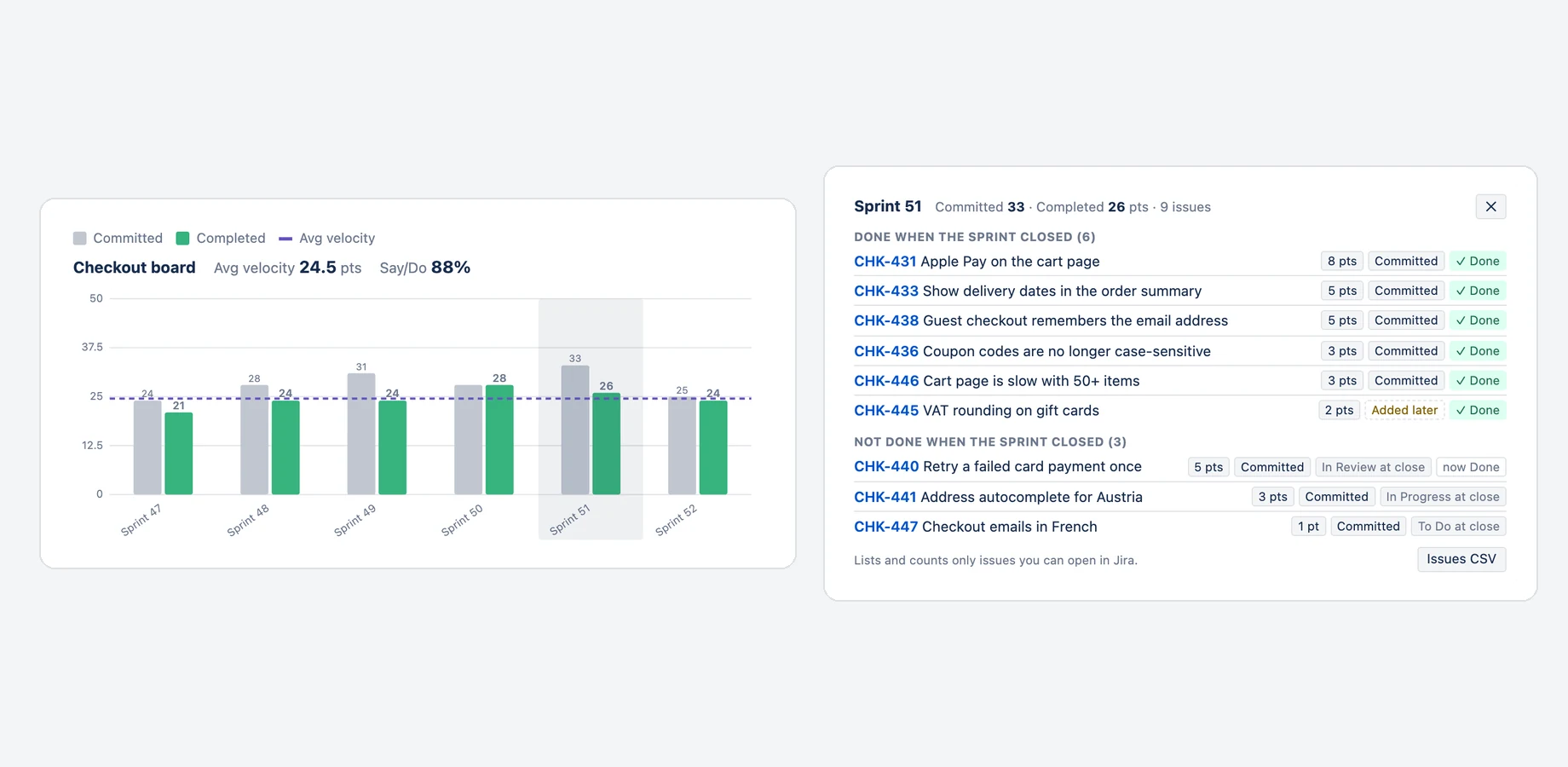
For every counted issue the list shows:
- Key and title, linked to the issue (opens in a new tab).
- The estimates it adds to the bars: “At start” counts toward Committed, “At close” toward Completed, for example “At start: 1 pt · At close: 3 pts” when the estimate changed during the sprint (“–” for no estimate, which counts as 0). With Issue count every issue counts 1.
- Committed when it was in the sprint at the start and not done then, or Added later when it joined after the start (also when it was created in the running sprint): then it is not part of the grey bar.
- A note when the issue was already done when it joined: “Completed before it was in the sprint — not counted, same as Jira”, “Done again during the sprint (was done at start)” (counts toward Completed only) or “Was done when the sprint started, reopened later” (neither bar, because it was open at the close).
- The status it had when the sprint closed. A ✓ marks the statuses that count as done, so these issues make up the green bar. When the status changed afterwards, for example an issue that was carried over and finished in the next sprint, its current status is shown as “now …”.
- Sub-task, when Include sub-tasks is on.
The issues are grouped into “Done when the sprint closed”, “Not done when the sprint closed” and “Completed outside of this sprint” (done before they joined, in neither bar), and the totals at the top are the same numbers as the bars. Issues CSV downloads the list of that sprint.
Keyboard, small gadgets and the free plan
- Keyboard: tab to the chart, move between sprints with the arrow keys, open with Enter or Space, close with Esc. Hover a bar or a label in the list for an explanation.
- In narrow gadgets and widgets the details of each issue move under its title; long lists scroll inside the panel.
- The list opens without asking Jira again; only the titles are loaded when you open it. If they cannot be loaded, the list stays complete and Retry loads them again.
- Without an active subscription, a click on a sprint shows the sprint's totals and a note that the details are part of Pro.
Who sees which numbers
Velocity Chart shows each person only what they may see in Jira, like Jira's own velocity chart.
- The board: you need permission to browse the board's project. Otherwise the gadget says “You do not have permission to view this board”.
- The issues: a sprint can hold issues of other projects (the board's filter decides) and issues with a security level. Only issues you can open in Jira are counted in the bars and listed in the sprint details. When some are left out, a muted line under the chart says how many, for example “2 issues hidden — you don't have permission to view them; their points are not counted.” Hover it for the reason and what to do. It never says which issues or how many points they carry. The sprint details show the same line for their sprint.
- Issues the app cannot read: an issue whose security level does not include the project role
atlassian-addons-project-accessis hidden from Velocity Chart itself and counted for nobody. A second muted line under the chart tells everyone who can open such issues how many there are, for example “3 issues in these sprints are hidden from Velocity Chart by an issue security level, so they are not counted.” Hover it for the fix (see “How it works” below). - Shared dashboards: two people can therefore see different numbers on the same dashboard, for example a stakeholder who can browse only one of the board's projects.
How it works
- The app reads the sprint as the app, then asks Jira for every load which of these issues you may browse (project permission and issue security level) and adds up only those. The answer is never cached.
- The 5-minute cache holds the sprint data of the board for everyone (issue IDs, keys, estimates and statuses, no titles and no people); it is filtered for each viewer before anything is shown.
- The hidden-issues line counts each issue once, also when it was carried over from one sprint to the next; the sprint details count it in every sprint it belongs to.
- An issue whose security level does not include Velocity Chart (Jira lists installed apps in the project role
atlassian-addons-project-access) cannot be read by the app at all, so it is counted for nobody, also not for people who may open it, and the bars can be lower than in Jira's own velocity report. The line under the chart says how many such issues the sprints shown hold, never which ones. To include them, a Jira admin adds that project role to the security level (Project settings → Issue security); if the app may not browse the whole project, give the role the Browse Projects permission as well. - The count is made for every load as you: one Jira search over the sprints shown (issue IDs and issue type only), and, only if it finds issues the cached sprint data lacks, the same search as the app. It belongs to you alone, is never cached or stored and does not change the numbers. If Jira does not answer in time, the line is left out without an error.
- After a Jira admin changes permissions or a security level, Jira can take a few minutes to apply the change everywhere, also in its own velocity report. Reload the dashboard after that.
- If Jira does not answer the permission check in time, the chart counts only the issues it could check and says “Velocity Chart could not check issue permissions; numbers may be incomplete”. Click Refresh after a moment.
Multiple boards PRO
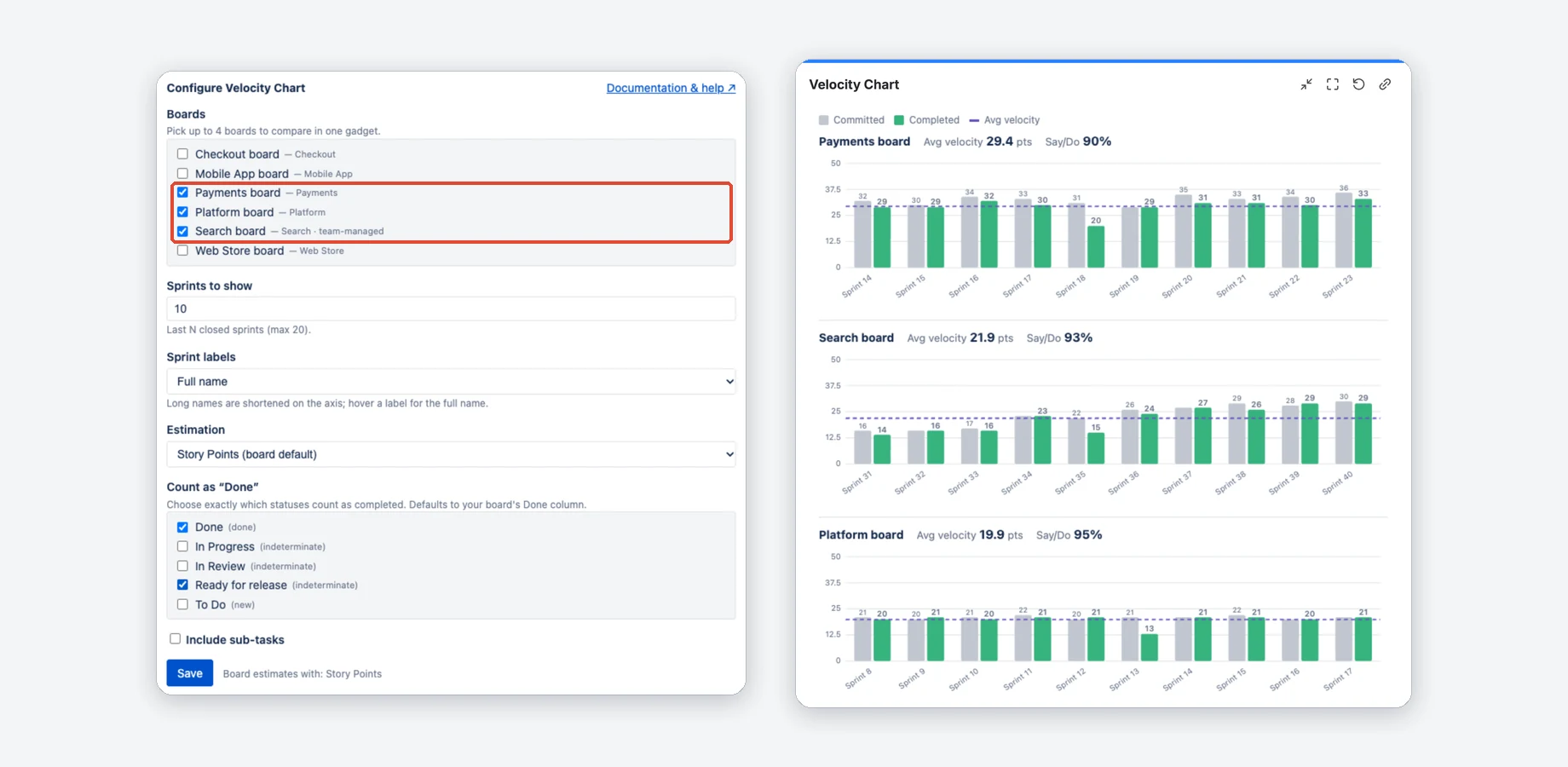
Tick up to four Scrum boards to compare teams in one dashboard slot. Each board gets its own chart, average and say/do, all with the same estimation and Definition of Done.
Good to know
- Count as “Done” lists the statuses of the first ticked board; the ticked names apply to every board.
- When you tick a fifth board, the first ticked board in the list is unticked.
- Velocity depends on each team's own estimation scale, so use it to follow trends rather than to rank teams.
- Without an active subscription a gadget with several boards shows only the first one.
Export PRO
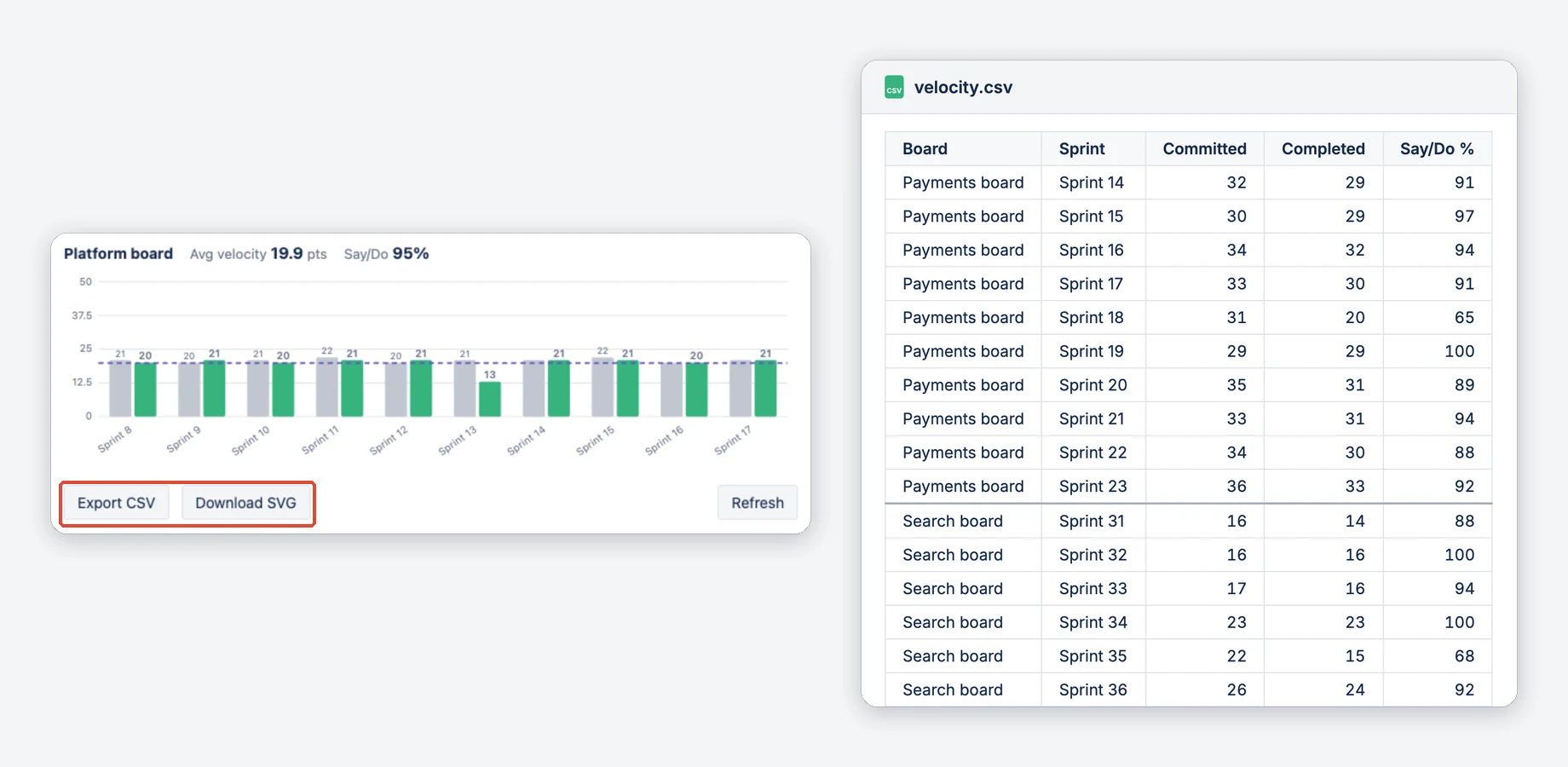
Two buttons below the chart save the numbers and the pictures.
- Export CSV downloads
velocity.csv, a CSV file with board, sprint, committed, completed and say/do % for every shown sprint of all boards in the gadget (UTF-8). - Download SVG saves each board's chart as an SVG image with a white background, for slides and reports.
- Issues CSV in the sprint details downloads the issue list of one sprint: issue, title, estimate at start, estimate at close, committed, done when the sprint closed, status at the close and now, sub-task and a counting note. “Committed” and “Done when the sprint closed” say what the bars count; the counting note explains issues the bars leave out or count only as completed. With Issue count the estimate columns are replaced by a single “Counts” column. If you read the file by column position or name, check your import: older exports had one “Estimate” column and no counting note.
Free vs Pro
There is one plan: the app is free for up to 10 users, and larger teams get a free trial. Pro features are on while your site has an active subscription, the trial included. Per-user pricing is on the Marketplace listing.
Without an active subscription, for example after the trial, the gadget keeps working in the reduced Free mode: one board, up to 7 sprints, the board's estimation and its Done column. Pro features return as soon as a subscription is active again.
Free and Pro side by side
| Capability | Free | Pro |
|---|---|---|
| Single-board velocity chart + average line | ✓ | ✓ |
| Company- & team-managed Scrum boards | ✓ | ✓ |
| Sprint labels (full name / numbers) | ✓ | ✓ |
| Sprints shown | up to 7 | up to 20 |
| Configurable Definition of Done | The board's Done column | ✓ |
| Estimation mode (issue count / custom field) | board default | ✓ |
| Include sub-tasks | — | ✓ |
| Say/do ratio | — | ✓ |
| Sprint details (the issues behind each bar) | — | ✓ |
| Up to 4 boards in one gadget | — | ✓ |
| CSV & SVG export, issue list per sprint | — | ✓ |
| Only issues you can open in Jira are counted | ✓ | ✓ |
FAQ & troubleshooting
Open a question for the answer.
It says “No closed sprints on this board yet”.
The board has no completed sprint yet. Start and complete a sprint, or pick a board that already has closed sprints. Classic Kanban boards have no sprints and are not listed.
The bars are empty or zero.
Your issues are estimated in a different field than the board's default. Open the gadget's Edit view, go to Estimation and choose the field your team actually uses (for example Story point estimate), or switch to Issue count. Estimation, Done statuses and sub-task handling are Pro settings.
A board is missing from the picker.
Only Scrum boards (company- and team-managed) in projects you can browse are listed, taken from the first 200 boards of the site. Classic Kanban boards are excluded because they have no sprints. New boards appear immediately.
It says “You do not have permission to view this board”.
The gadget only shows boards whose project you can browse in Jira, so ask your Jira admin for access to the board's project. The message can also appear for a board you can open if Jira did not answer the check, for example during a short outage. Reload the dashboard after a couple of minutes and the app checks again.
A colleague sees different numbers on the same dashboard.
Each person sees only the issues they can open in Jira. When a sprint holds issues of a project, or with a security level, that one of you cannot open, those issues are left out for that person, as in Jira's own velocity chart. The line “N issues hidden” under the chart tells you that this applies to you. See who sees which numbers.
It says “Velocity Chart could not check issue permissions; numbers may be incomplete”.
Jira did not answer the permission check for your issues in time, usually a short rate limit or outage. The chart then counts only issues whose check went through, so nothing you may not see is shown, and the numbers can be lower than usual. Click Refresh after a moment. If it keeps happening, ask your Jira admin to check that Velocity Chart is installed and has access to Jira.
A note under the chart says estimates come from another field.
The board's estimation field is empty for some issues in the sprints shown, so Velocity Chart takes their estimate from the standard Story Points field instead. Jira's own velocity report counts 0 for these issues, so your bars can be higher than in Jira. The note names both fields and the affected sprints. To match Jira, fill the board's field or change the board's estimation setting to the field your team uses. The note appears only when such an estimate is actually counted.
It says “N issues in these sprints are hidden from Velocity Chart by an issue security level”.
Velocity Chart reads the sprints as an app. Jira hides an issue from it when the issue's security level does not include the project role atlassian-addons-project-access, the role Jira uses for installed apps. Such issues are counted for nobody, so the bars can be lower than in Jira's own velocity report. Only people who can open the issues see the note, with the number but never which issues. To include them, a Jira admin adds that project role to the security level (Project settings → Issue security). If the app may not browse the whole project, give the role the Browse Projects permission too. Jira can take a few minutes to apply the change.
It says “Velocity Chart could not read the configuration of this board”.
Jira did not return the board's configuration (the message names the HTTP status), usually a short rate limit or outage. The app needs it to apply the board's saved filter, so it shows an error instead of a chart that could include issues of other boards. It already retried once. Click Refresh after a minute and check that the board opens in Jira. A similar message says the board's saved filter was not found: check in the board settings that the filter still exists.
It says “Could not read sprints” or “Could not read the issues of … sprints”.
Jira did not answer the request, usually a short rate limit or outage. Nothing is cached for such a result, so click Refresh or reload the dashboard after a minute.
The numbers look out of date.
Results are cached for up to five minutes. Click Refresh in the gadget to recalculate right away.
Does an issue that was carried over count in both sprints?
Only as committed. Completed counts the issues that were done when the sprint closed, as in Jira's own velocity report. An issue that was carried over unfinished counts as completed only in the sprint in which it was finished. An issue that was already done when it joined a sprint counts in neither bar.
The numbers differ from Jira's velocity report.
Velocity Chart follows the same counting rules: committed is what was in the sprint at the start and not done then, completed is what was done when the sprint closed, with the estimates from those two moments. Differences remain when you choose your own Done statuses or estimation field (Pro), when issues were removed from a sprint before it closed (Jira counts them as committed, the app cannot see them), when the board's estimation field is empty for some issues (Jira counts 0, the app uses the Story Points field) and when an issue security level hides issues from the app (see above).
How is this different from Jira's built-in velocity report?
Jira's report lives on the board's Reports page and uses that board's own Done column and estimation setting. Velocity Chart is a dashboard gadget: you choose which statuses count as Done and how to estimate, can chart up to four boards in one gadget, click a sprint to see the issues behind its bars, and get an average say/do ratio and CSV/SVG export (Pro).
Does Velocity Chart support team-managed projects?
Yes. Team-managed Scrum boards appear in the board picker tagged “team-managed” and use the same calculation as company-managed boards.
Does the app change my Jira issues?
No. Velocity Chart is strictly read-only and requests no write permissions. It only reads sprint data to draw the chart and keeps a short-lived cache of it in Atlassian Forge Storage (issue IDs, keys, estimates and statuses; no titles, no people). See the Privacy Policy and the Security Policy.
Support
Questions, bugs or feature requests? We typically respond within 1–2 business days (Monday to Friday).
Email: support@janekbehrens.de
Bug reports & feature requests: github.com/janekbehrens/velocity-chart-for-jira-issues
Support page: common questions and what to include in a bug report
Legal: Privacy Policy · Terms of Service · Security Policy