What to look for in a Jira progress tracking app
Before comparing specific apps, it helps to define what "progress tracking" means in Jira. There are actually three distinct needs — and most apps serve only one or two of them well:
- Issue-level progress: A visual indicator (percentage or bar) on individual issues showing how far along that issue is — calculated from subtasks, child issues, or manually set.
- Sprint-level progress: How much work has been completed within the current sprint — visible on the sprint board or in a dashboard gadget.
- Portfolio-level progress: Rollup progress across multiple epics, versions, or projects — typically needed by managers and directors.
An app solving issue-level progress (adding a progress bar to every ticket) is architecturally different from an app solving portfolio-level progress (aggregating across projects). Don't buy the complex tool if you only need the simple one.
Disclosure: One of the apps compared below — Visual Progress Tracker for Jira — is my own product. I've tried to be fair about its limitations. If you spot an inaccuracy about a competitor, let me know.
Feature comparison at a glance
| App | Issue-level bar | Sprint gadget | Portfolio rollup | No-code setup | Forge / Cloud security | Price |
|---|---|---|---|---|---|---|
| Jira native | ✗ | Partial (burndown only) | Epics only | ✓ | ✓ | Included |
| Visual Progress Tracker | ✓ | ✓ (gadget) | ✗ | ✓ | ✓ Forge | Free trial + per-user |
| Structure by Tempo | ✓ (via rollup) | Via views | ✓ | ✗ (complex config) | Connect | High ($$$) |
| BigPicture | Via Gantt | ✓ | ✓ | ✗ (steep learning curve) | Connect | High ($$$) |
| Custom Fields + JQL | Manual only | With JQL config | ✗ | ✗ (admin required) | ✓ | Included (time cost) |
Option 1 — Jira native progress tracking
Jira Cloud includes sprint burndown charts, velocity reports, and an Epic progress indicator that shows how many child stories are done vs. total. Useful as a baseline, but limited in several ways that matter for modern teams.
- Zero additional cost
- No setup required
- Burndown and velocity built-in
- Epic progress bar on the backlog
- No visual progress bar on individual issues
- Epic progress shows count, not percentage of effort
- Cannot show progress in list view columns
- No dashboard gadget for issue-level progress
- Cannot calculate from subtask story points
Who it fits: Teams that only need sprint-level visibility and are comfortable with burndown charts as the primary progress signal.
Option 2 — Visual Progress Tracker for Jira
 Forge · Runs on Atlassian
Adds color-coded progress bars to Jira issues — automatically calculated from subtask or child issue status. Available as a custom field shown directly on issue cards and in the list view. Includes a sprint progress dashboard gadget. Runs entirely within Atlassian infrastructure ("Runs on Atlassian" badge).
- Visual progress bar on every issue
- Three field types: status-based, subtask, manual
- Visible in list view column — no clicks needed
- Dashboard gadget for sprint overview
- No-code setup — under 2 minutes
- Forge-native: data stays on Atlassian
- No portfolio-level rollup across projects
- No Gantt chart or timeline view
- Jira Cloud only — no Server/Data Center
- List view column requires Number Field type in Jira (platform limitation)
Who it fits: Scrum teams and product managers who want a quick visual answer to "how far along is this issue?" on every ticket — without complex configuration or high cost. For the full feature walkthrough — three field types, JQL queries, dashboard gadget, REST API — see the dedicated Jira Progress Bar guide.
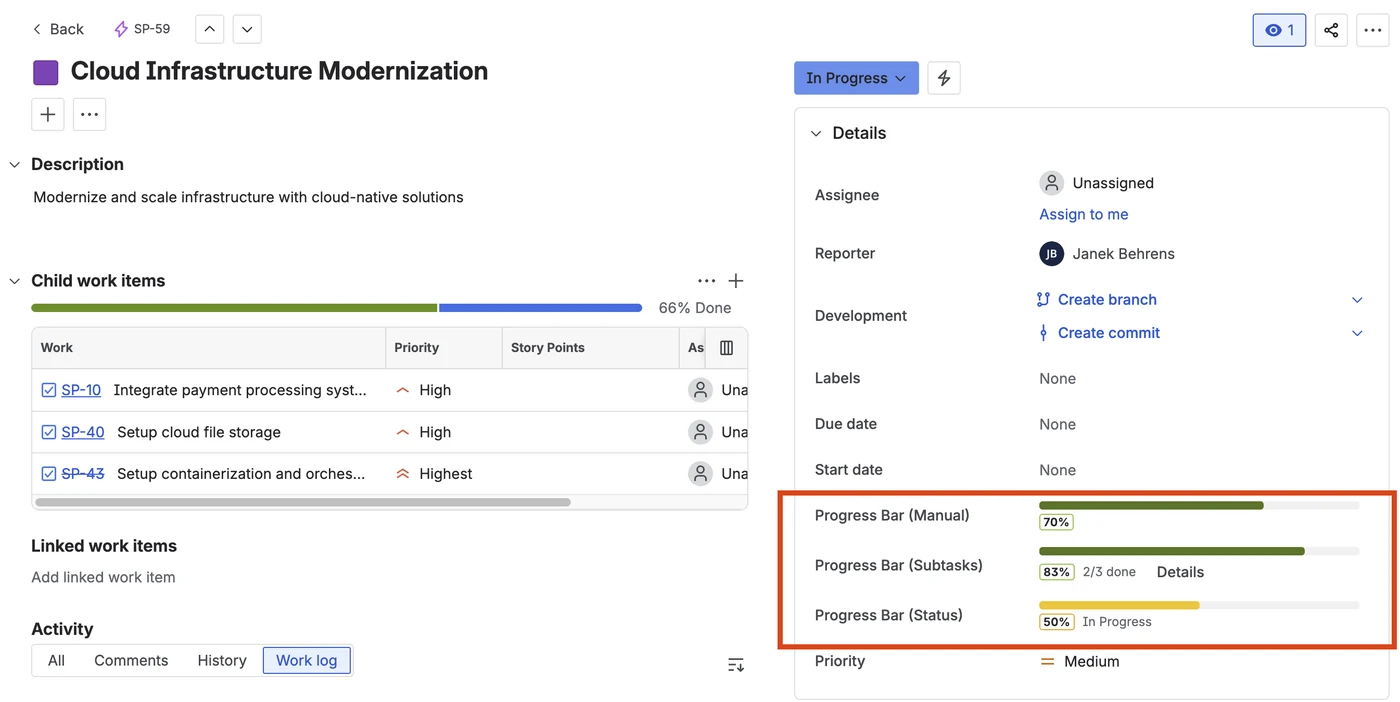
Progress bar on a Jira issue — color-coded, automatically calculated from subtask status
Option 3 — Structure by Tempo
Structure is a full-featured hierarchical view for Jira — supporting arbitrary parent-child relationships beyond Jira's native Epic/Story/Subtask hierarchy. Rollup columns (including progress) aggregate values from child issues up to parent levels. Powerful, but requires significant configuration by a Jira admin.
- Deep portfolio hierarchy support
- Rollup progress across any level
- Flexible structure views and formulas
- Supports custom field aggregation
- Steep learning curve — requires Jira admin expertise
- High price (especially for large teams)
- Connect app — data passes through Tempo servers
- Overkill for teams that just need issue-level bars
Who it fits: Enterprise engineering organizations managing large portfolios across multiple projects with complex hierarchy requirements.
Option 4 — BigPicture by SoftwarePlant
BigPicture is a project portfolio management suite for Jira, including Gantt charts, resource planning, risk management, and OKR tracking. Progress is shown on the Gantt view per task and at the program level. Feature-rich but architected for PMOs, not agile development teams.
- Gantt chart with progress on timeline
- Resource planning and capacity views
- Program-level and portfolio progress
- OKR module included
- Very high price — PMO-tier licensing
- Complex to configure and learn
- Connect app — no "Runs on Atlassian" badge
- Heavy: performance issues on large backlogs
Who it fits: PMOs and delivery directors managing waterfall/hybrid programs who need Gantt and resource planning. Not the right tool for agile scrum teams wanting a simple progress bar on issues.
Option 5 — Custom fields and JQL (DIY)
Some teams build their own progress tracking by creating a Number field and using Jira Automation to update it based on subtask transitions. This works — but it requires a Jira admin to build and maintain the rules, and falls apart when teams change status workflows.
- No additional app license
- Fully customizable
- Data stays in Jira
- Requires Jira admin time to build
- Automation rules break when workflows change
- No visual bar — just a number
- Maintenance burden grows with team size
Who it fits: Teams with strong Jira admin expertise who want full control and have time to maintain automation rules. See the no-scripting progress tracking guide for a lower-maintenance alternative.
Which option is right for your team?
The choice comes down to three questions:
- Do you need progress on individual issues? If yes, only Visual Progress Tracker and Structure (with configuration) solve this directly. Jira native, BigPicture, and the DIY approach don't provide a visual bar on each ticket.
- Do you need portfolio-level rollup? If yes, Structure or BigPicture. Visual Progress Tracker explicitly doesn't do cross-project portfolio rollup.
- Does your organization require data residency or "Runs on Atlassian" compliance? If yes, only Forge apps qualify. Structure and BigPicture are Connect apps that route data through third-party servers.
For most scrum teams: If you want a progress bar on issues and a sprint dashboard gadget without admin complexity, Visual Progress Tracker is the lightweight path. If you're managing a portfolio of 10+ projects and need Gantt and resource planning, BigPicture or Structure is the appropriate investment — and the associated complexity and cost.
Frequently asked questions
Does Jira have a built-in progress bar for issues?
Jira Cloud includes an Epic progress indicator (shows child issue counts) but not a visual percentage bar on individual issues. To add progress bars to Jira issues — automatically calculated from subtask status — you need a Marketplace app like Visual Progress Tracker for Jira.
What is the best app for tracking progress in Jira?
For visual progress bars on individual issues and sprints: Visual Progress Tracker for Jira — lightweight, no-code, Forge-native. For full portfolio management with Gantt charts: Structure by Tempo or BigPicture — more powerful but significantly more complex and expensive.
What does "Runs on Atlassian" mean for Jira apps?
"Runs on Atlassian" is the badge for Atlassian Forge apps — they run entirely within Atlassian's own infrastructure, with no data passing through third-party servers. For teams with GDPR, data residency, or security compliance requirements, Forge apps provide stronger guarantees than Connect apps (which host data externally). See Forge vs. Connect: which is more secure? for a detailed breakdown.
Add visual progress bars to your Jira issues
Visual Progress Tracker for Jira — color-coded progress bars, sprint gadget, automatic calculation from subtasks. Forge-native. Free trial included.
Try it free on Marketplace →