Epics are a blind spot in Jira
Jira gives epics a list of child stories, but not a completion percentage. You can open the epic, see which stories are "Done" and which are still open, and mentally calculate a rough figure — but that number isn't surfaced anywhere by default. It doesn't appear on the epic card in the backlog, in the list view, or on a dashboard.
For teams managing multiple epics in parallel, this creates a common problem: you know each sprint is moving, but you don't know which epics are nearly done and which are stuck at 20% after three sprints. That information lives in your head, not in Jira.
Quick answer: Jira does not show a native progress percentage on epics. You add one by installing a custom field app that automatically calculates completed child issues ÷ total child issues as a percentage. No formulas, no scripting.
Why the subtask approach works
There are a few ways teams try to track epic progress in Jira:
- Story points: Divide completed points by total points. Works if estimates are accurate and consistent — which they often aren't mid-epic.
- Manual percentage field: A team member updates a custom number field. Requires discipline and maintenance.
- Subtask count: Count resolved child issues ÷ total child issues. This is objective, automatic, and reflects actual delivery rather than estimates.
The subtask approach has one major advantage: it requires no human input after the field is set up. When a story is resolved, the epic's percentage updates automatically. There is nothing to maintain. For the full breakdown of the three field types — status-based, subtask-based, and manual — and how they appear in the list view and dashboards, see Jira Progress Bar: How to Track Issue Progress Visually.
How Visual Progress Tracker calculates it
The Progress Bar (Subtasks) field in Visual Progress Tracker is a Jira custom field that reads the parent issue's child hierarchy and computes:
progress = resolved children ÷ total children × 100
This works at every level of Jira's hierarchy: subtasks under a story, stories under an epic, or child epics under a parent. The field also displays a "X/Y done" count alongside the bar — for example "3/5 done" — so the raw numbers are always visible without clicking through.
The color coding follows the same thresholds as the other field types: red below 34%, yellow up to 67%, green above. All thresholds are configurable in Admin Settings.
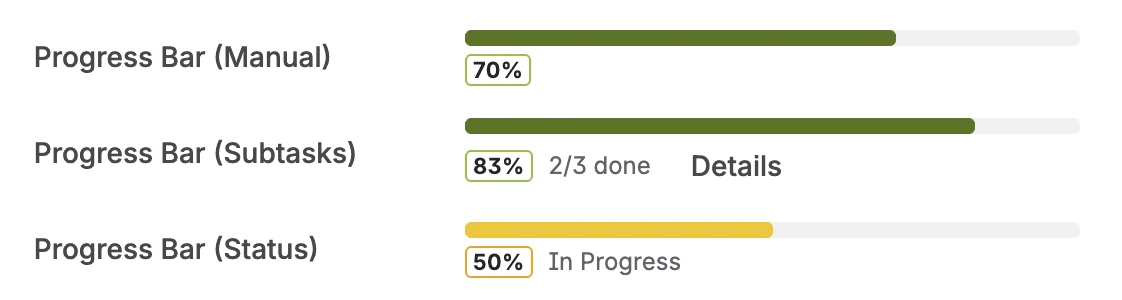
The subtask-based field on an issue — percentage badge, "X/Y done" count, and color-coded bar
The Details view: drill into child issues
The subtask field includes a Details button. Clicking it expands a per-child breakdown directly below the progress bar — each child issue is listed with its key, current status, and individual progress percentage. The list lazy-loads on demand, so it doesn't slow down the issue view when you just want a quick look at the top-level number.
This makes it easy to answer questions like "which stories are pulling this epic's completion down?" without leaving the epic view or running a separate JQL query.
The Details view — per-child status and individual progress, expandable directly on the epic
Tracking all epics at once
Adding the subtask progress field as a column to the Jira list view or backlog makes it possible to scan all epics simultaneously. Sort the column ascending to bring the lowest-completion epics to the top. You can immediately see which epics need attention and which are on track.
If you use the Progress Tracker Overview dashboard gadget, you can configure it to show only epics by adding a JQL filter like type = Epic. The gadget then shows every epic with a progress bar and an overall average — useful for quarterly planning reviews or stakeholder updates.
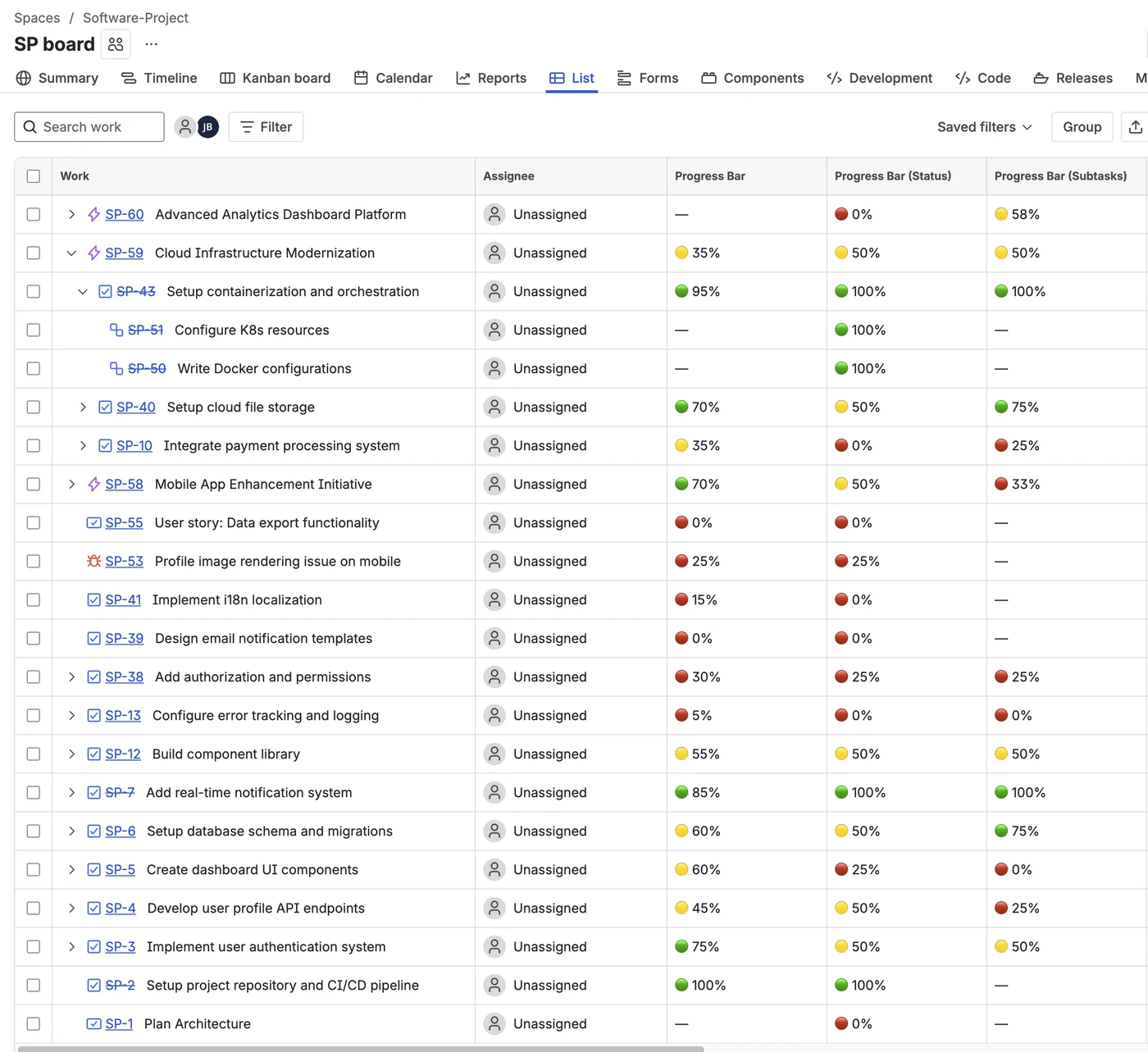
Progress bar column in the Jira list view — sort to surface which epics need attention
Tip: You can use all three field types on the same issue. Add a subtask field on your epics for automatic completion tracking, and a manual field on individual stories where you want to capture effort that doesn't map cleanly to subtask count.
Setting it up
-
1Install Visual Progress Tracker from the Atlassian Marketplace. Free trial available, no credit card required.
-
2Create the field. Go to Jira Settings → Work items → Fields → Create field. Select "Progress Bar (Subtasks)" and give it a name — for example "Epic Progress" or just "Progress".
-
3Add it to your epic screen. Go to Project Settings → Screens → Edit screen and add the field. It will now appear on every epic (and any other issue type that has child issues).
-
4Add it as a list view column. In any Jira list view, click the column area and add the field. Now you can see all epics ranked by completion at a glance.
-
5(Optional) Add the dashboard gadget. Open a Jira Dashboard → Add gadget → search "Progress Tracker Overview". Enter
type = Epicas a JQL filter to see all epics with progress bars and an overall average.
Frequently asked questions
How do I track epic progress in Jira?
The most reliable method is subtask-based tracking: count how many child issues (stories or subtasks) are resolved and divide by the total. Apps like Visual Progress Tracker for Jira automate this as a custom field — the percentage updates automatically every time a child issue is resolved.
Does Jira show progress on epics automatically?
Jira Cloud does not have a native progress percentage field for epics. The epic detail view lists child stories and their statuses, but there is no automatic completion percentage displayed as a progress bar. A custom field app from the Atlassian Marketplace adds this capability.
What is subtask-based progress tracking in Jira?
Subtask-based progress calculates the number of resolved child issues divided by the total number of child issues. If an epic has 8 stories and 6 are resolved, it shows 75% complete. This approach is objective, automatic, and works at every level of the Jira hierarchy: subtasks on a story, stories under an epic, and child epics under a parent.
Can I see per-child issue progress on an epic?
Yes. The subtask-based field includes a Details button on the parent issue that expands a breakdown of each child — showing the child issue's key, status, and individual progress percentage. This is useful for identifying which specific stories are blocking an epic from reaching 100%.
Can I use progress bars on issues other than epics?
Yes. The subtask-based field works on any issue that has child issues — stories with subtasks, features with user stories, and so on. The manual and status-based fields work on any issue type. You can add all three field types to a project and use different ones on different issue types as needed.
See your epic progress automatically
Visual Progress Tracker adds a subtask-based progress bar to every epic — and a Details drill-down to see exactly which stories are holding it back. Free trial, no credit card required.
Try it free on Marketplace →