All apps
DevOps Metrics for Jira icon
Jira Cloud · Forge-native · Dashboard gadget

All four DORA metrics,
on your Jira dashboard

Deployment frequency, lead time, change failure rate and MTTR — calculated from the Jira data you already have. No CI/CD setup, no second product, no spreadsheet.

Free for up to 10 users · Benchmark bands included · Read-only, runs on Atlassian
Atlassian Marketplace Partner
No CI/CD integration needed
Aggregates only · Never per person
Free for up to 10 users
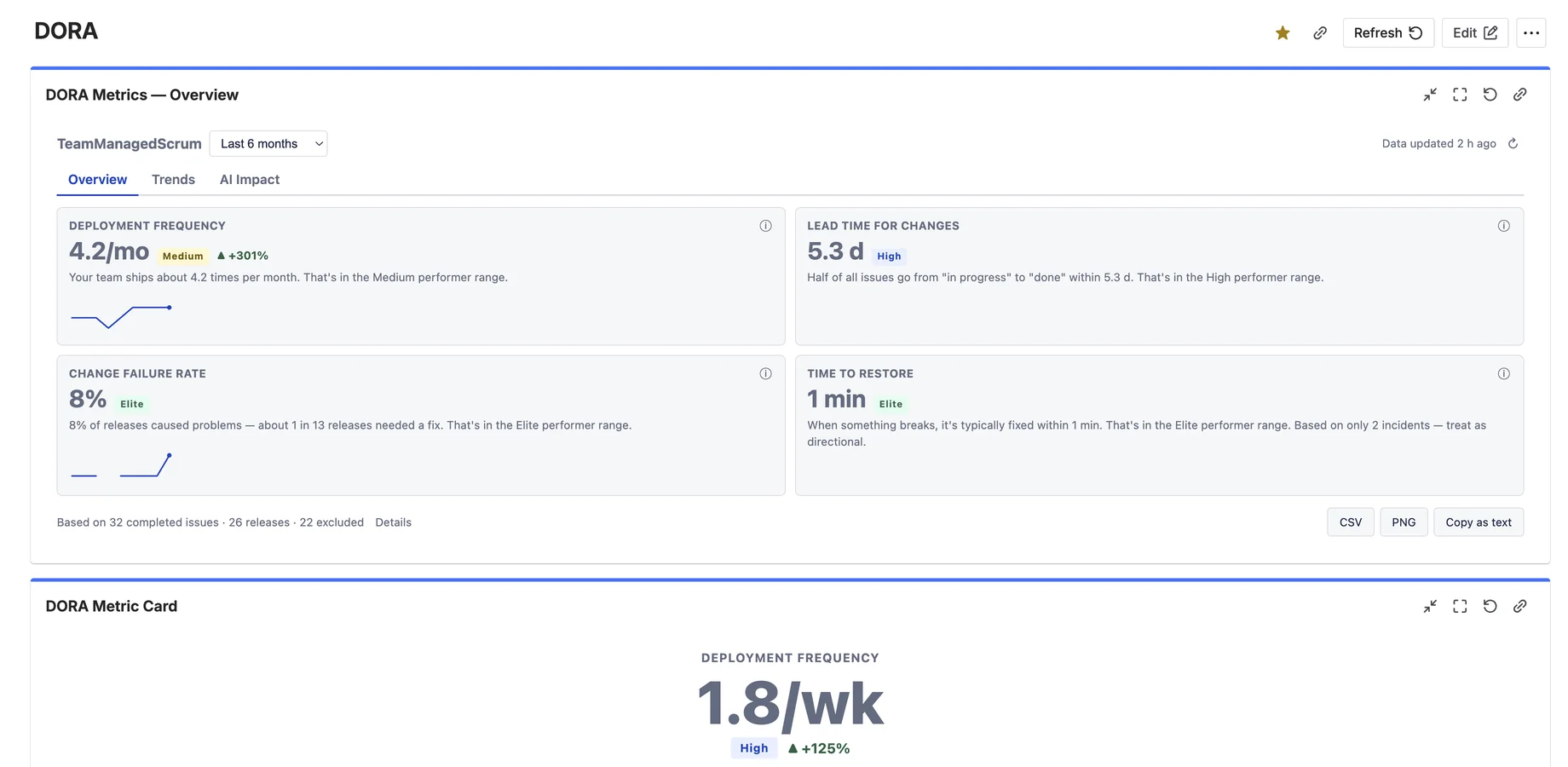
DORA Metrics overview gadget on a Jira dashboard showing deployment frequency, lead time for changes, change failure rate and MTTR tiles with Elite, High, Medium benchmark bands and plain-language explanations

Four tiles, benchmark bands and a plain-language sentence under every number — engineering performance at a glance.

Where do your DORA numbers live today?

Without this app DevOps Metrics for Jira
DORA lives in slides & spreadsheets someone updates by hand Live gadget on every Jira dashboard, refreshed automatically
Platform tools need CI/CD wiring, budget and an admin project Works with the Jira data you already have — set up in minutes
Raw numbers without context DORA benchmark bands (Elite / High / Medium / Low) built in
"AI ROI" measured in prompt counts Before/after AI rollout deltas on real delivery outcomes PRO
Per-user surveillance risk Team-level aggregates only — GDPR & works-council friendly
One-size-fits-all definitions Your deployment, incident and done definitions PRO

Honest by design: the app approximates the four DORA keys from Jira work items and shows exactly how each number is calculated. Directionally correct, consistently measured — without a platform project. See how each metric is calculated →

From “Add gadget” to real numbers in under 3 minutes

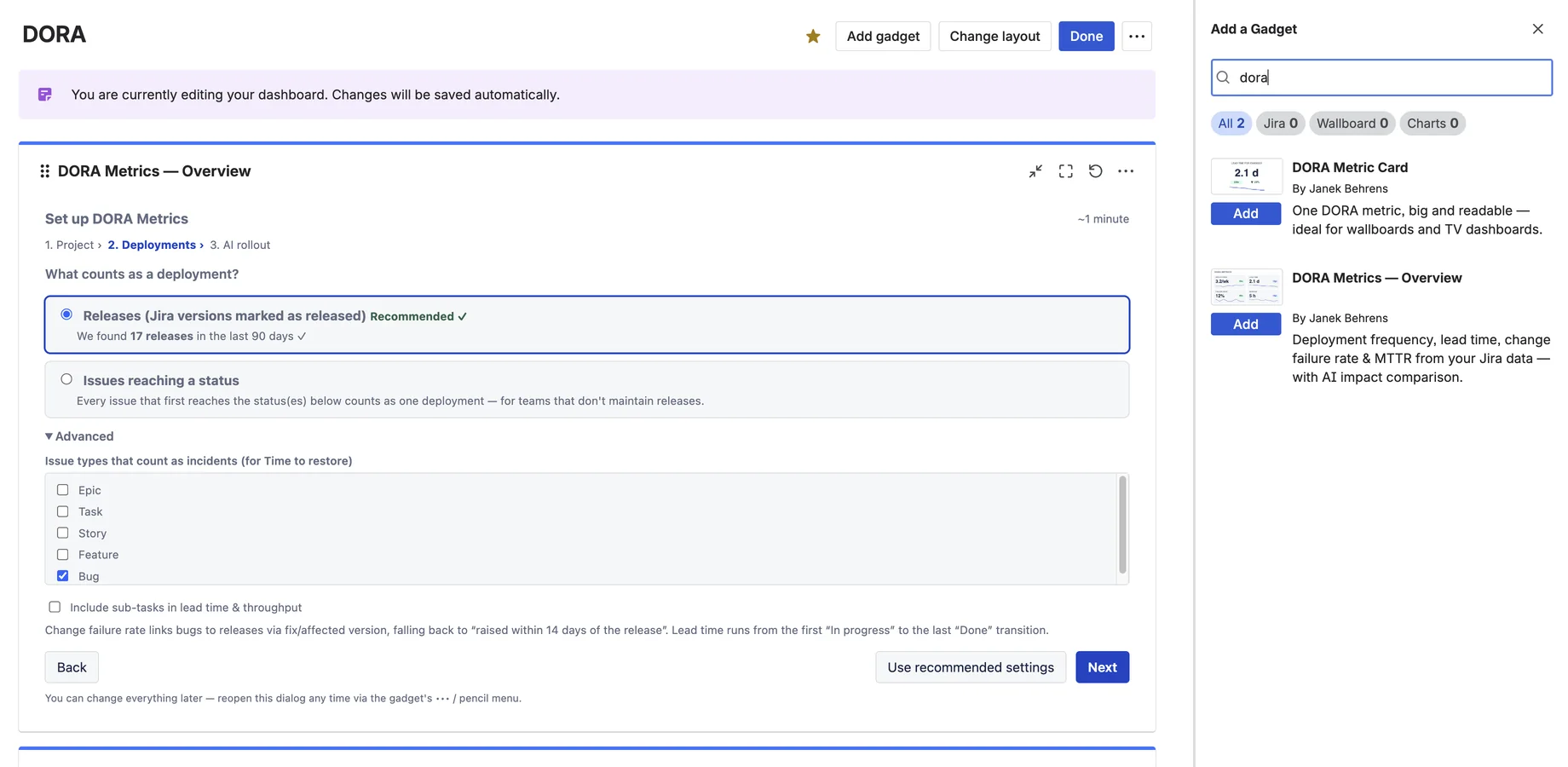
The gadget renders a meaningful sample the moment you add it. Pick your project and the setup wizard inspects it for you — if your team marks Jira versions as released, it recommends counting releases; if not, it suggests status transitions instead.

Every setting ships with a recommended value. One click on “Use recommended settings” and you're done.

  • Deployment = releases, status transitions or issue types — your call
  • Automatic recommendation: “We found 17 releases in the last 90 days ✓”
  • Incident types and sub-task handling configurable PRO
  • Change everything later — settings are never locked in
DORA Metrics setup wizard step two: choosing what counts as a deployment in Jira, with releases recommended after finding 17 releases in the last 90 days

Numbers your whole team can read

Benchmark bands

Every metric is classified against the published DORA research — Elite, High, Medium or Low — so a number like “lead time 3.2 days” immediately means something to everyone in the room.

Plain language

“12% of releases caused problems — about 1 in 8 needed a fix.” Every tile carries a sentence a non-technical stakeholder understands, plus a “How we calculate it” popup for the skeptics.

Trends & markers

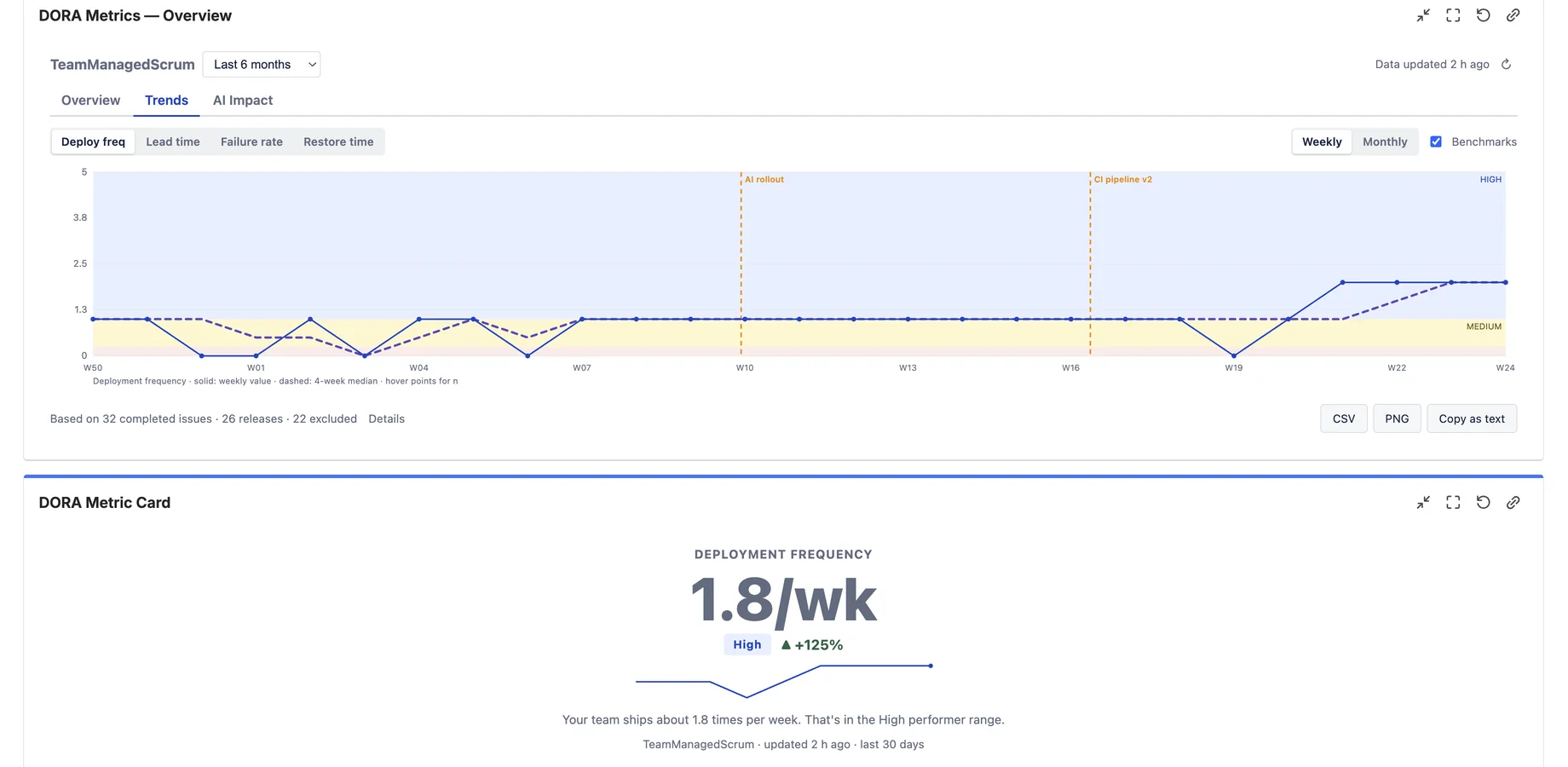
Weekly or monthly trends per metric with benchmark zones in the background, a smoothed median line, and event markers PRO for rollouts, re-orgs or new pipelines.

Also included

  • Instant sample data before any configuration
  • Data-quality footnote: what was excluded and why
  • Multi-project aggregation, up to 10 projects (Pro)
  • Wallboard “Metric Card” gadget — one huge metric (Pro)
  • PNG report, CSV and copy-as-text exports (Pro)
  • Dark mode & keyboard-navigable UI

Tell the story behind the curve

Deployment frequency trend over six months in Jira with DORA benchmark zones, a smoothed median line and dashed event markers for the AI rollout and a new CI pipeline

Weekly or monthly, with benchmark zones in the background — and your own markers PRO for the moments that changed the curve: AI rollout, new pipeline, team re-org.

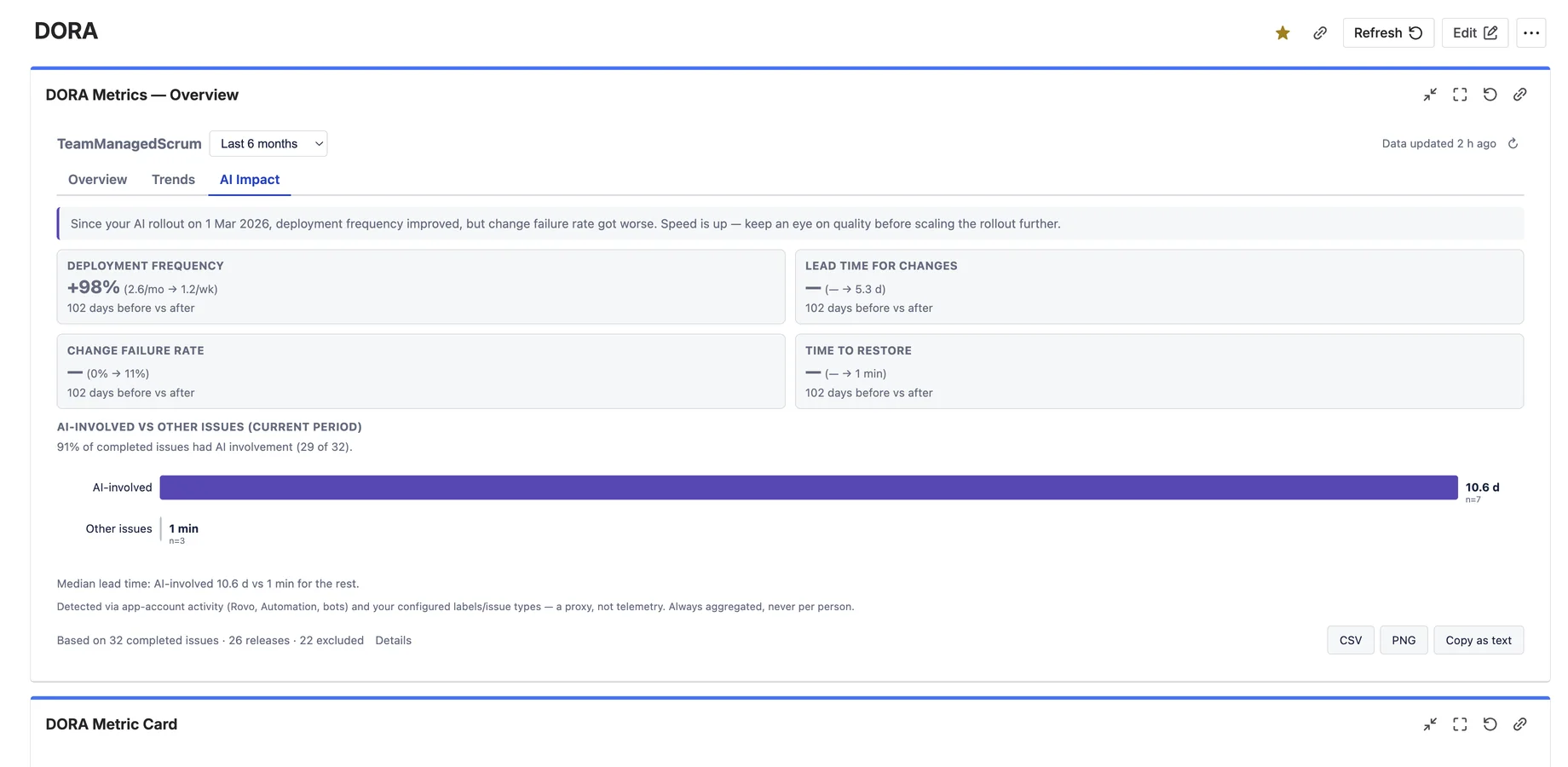
AI impact tab comparing DORA metrics before and after a Copilot rollout in Jira, with delta cards, a plain-language verdict and AI-involved versus other issues lead-time bars

The AI question, answered with delivery data

Everyone's rolling out Copilot, Rovo or coding agents — and leadership wants to know if it's working. Prompt counts don't answer that. Delivery outcomes do.

Set your AI rollout date and the AI Impact tab compares equal periods before and after on all four DORA metrics, with an honest plain-language verdict. A second view compares AI-involved issues against the rest in the same period.

  • Before/after deltas on every DORA metric
  • Deterministic verdict — rule-based, no LLM, no hallucinations
  • AI involvement via labels, issue types and automation activity
  • Always aggregated — never a per-person metric

One metric, huge — the wallboard gadget

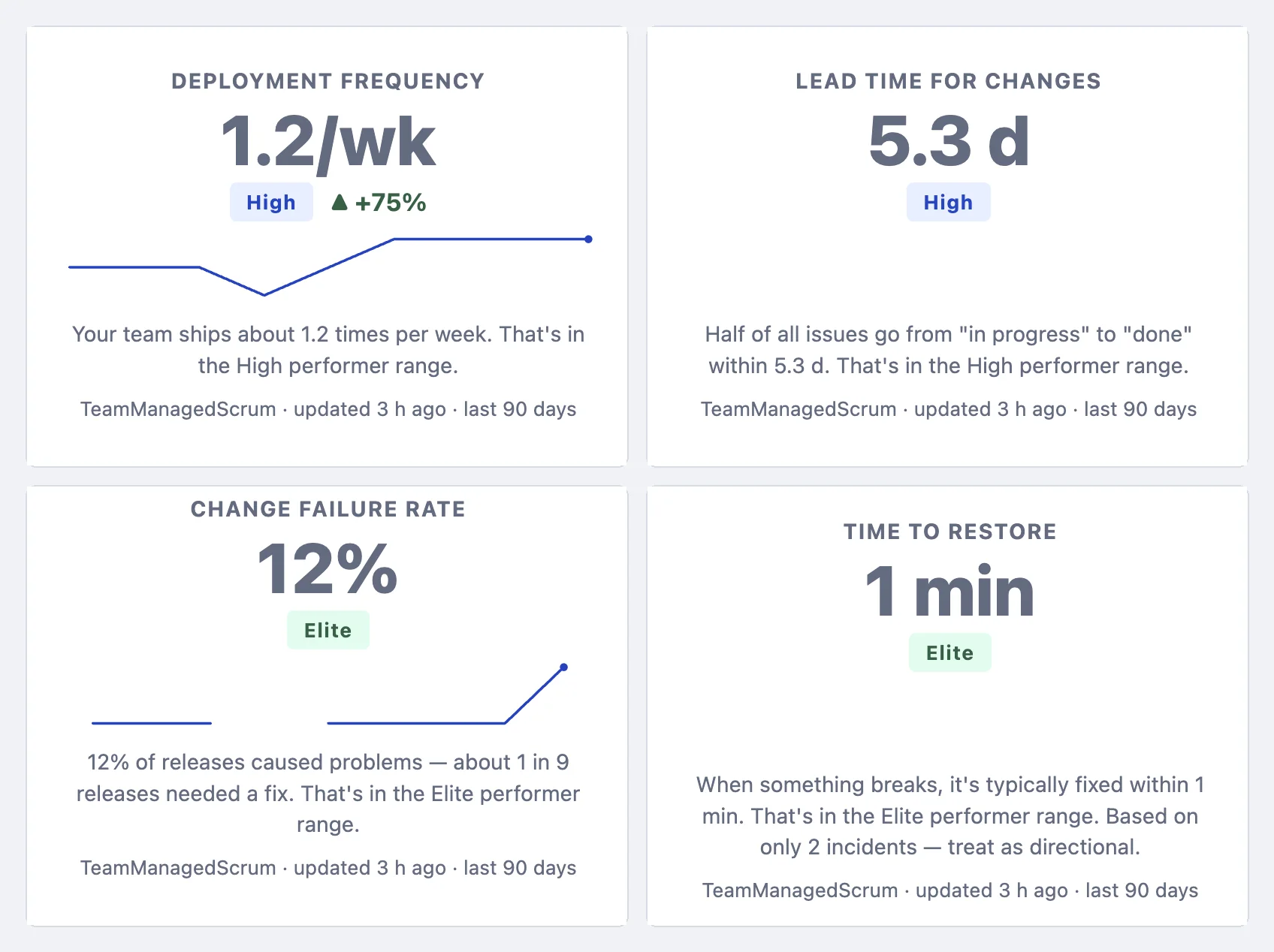
The DORA Metric Card shows a single metric big and readable from across the room — with its benchmark band, trend arrow and sparkline. Put four of them on a TV dashboard and the whole floor knows where delivery stands.

  • One gadget per metric — mix and match on any dashboard
  • Inherits the definitions you set in the Overview gadget
  • Auto-refreshes — built for always-on wallboards
Four DORA Metric Card gadgets for Jira wallboards: deployment frequency 1.2 per week High, lead time 5.3 days High, change failure rate 12 percent Elite and time to restore Elite

On your dashboard in 3 steps

1

Install & add the gadget

Install from the Marketplace, open a Jira dashboard, choose Add gadget and search for DORA.

2

Pick your project

The wizard inspects it and recommends what should count as a deployment. One click accepts the defaults.

3

Read your metrics

The first analysis crawls up to 12 months of history in the background — then the gadget loads instantly, every time.

Common questions

Your Jira already knows your releases, status transitions, bugs and incidents. The app approximates the four keys from that data and shows exactly how each number is calculated. It's directionally correct and consistently measured — ideal for teams that want DORA visibility without a platform project. If you need pipeline-level precision across CI tooling, you need a platform like Compass; if you need answers on your Jira dashboard this week, you need this gadget.

You decide. The default — recommended automatically if your team maintains them — is Jira versions marked as released. Teams without releases can count issues reaching specific statuses instead. Incident types for MTTR and sub-task handling are configurable too PRO.

Yes — that's the signature feature. Set your rollout date and the AI Impact tab compares equal periods before and after on all four metrics with a plain-language verdict, plus an AI-involved vs other issues comparison. Detection uses labels, issue types and automation activity — a transparent proxy, always aggregated, never per person.

No and no. The app is strictly read-only. It stores only weekly aggregate counters and duration statistics in Atlassian Forge Storage — no names, no account IDs, no per-person metrics, ever. Your data never leaves Atlassian — see the Security Policy.

Free for teams of up to 10 users, with a free trial for larger sites. The free experience is a real DORA overview for one project — tiles, benchmark bands and trends. Pro adds the AI Impact analysis, custom definitions, multi-project views, the wallboard Metric Card, event markers and exports. See the Marketplace listing for per-user pricing.

Engineering performance, where everyone can see it.

Free for up to 10 users — all four DORA metrics on your dashboard, in minutes.

DORA™ is a trademark of Google LLC. DevOps Metrics for Jira is an independent product by Janek Behrens and is not affiliated with or endorsed by Google. “DORA metrics” refers to the four software delivery metrics defined by the DevOps Research and Assessment program.