The symptoms of an unhealthy Jira backlog
Backlog health problems rarely announce themselves. They build gradually until the symptoms become impossible to ignore: sprint planning that takes three hours instead of one, constant "can someone give this more context?" questions in Slack, and the slow creep of issues that were "important" two quarters ago and haven't moved since.
The underlying causes are almost always the same few issues:
- Stale issues: Tickets that haven't been touched in weeks or months. Nobody knows if they're still relevant. Nobody wants to delete them in case they are.
- Missing descriptions: The summary says "Fix login bug." The description is empty. The developer who filed it left the team six months ago.
- No story point estimates: Sprint capacity planning becomes guesswork. Velocity tracking becomes meaningless.
- No assignees: In a Kanban flow, unassigned work is work that nobody is accountable for moving forward.
- Overdue items: Due dates were set, then missed, then never updated. The backlog now contains a graveyard of past commitments.
- No priority score: The team uses "Priority: High" for everything. When everything is urgent, nothing is.
Each of these issues is individually manageable. The problem is that they compound silently — and by the time a Scrum Master or Product Owner notices, the backlog has hundreds of issues in various states of disrepair.
Quick answer: Jira does not include a backlog health score natively. You can run JQL queries to find specific issues, but there is no automatic aggregated score. Priority Scoring for Jira calculates a Board Health Score (0–100) across up to 8 configurable quality criteria — no JQL, no scripting.
What is a Board Health Score?
A Board Health Score is a single number between 0 and 100 that represents the overall quality of all open (non-done) issues in a Jira project. It's not just the backlog — it includes issues currently In Progress, In Review, or in any other active workflow state. The name "Board Health" reflects that: it's the health of everything your team is actively responsible for, not just the queue.
The score is calculated by checking each open issue against a set of quality criteria. Each criterion that fails subtracts from the total. A score of 100 means every active issue passes all checks. A score of 40 means 60% of your open work has at least one quality problem.
The score is most useful as a trend. A team that scores 62 this week and 71 next week is improving. A team that scores 80 consistently but drops to 55 after a busy release crunch has a clear signal: time to refinement.
The 8 health criteria — and what each one catches
Different teams care about different quality signals. A Scrum team without story points can't plan velocity. A Kanban team without assignees has no accountability for work in flight. Priority Scoring for Jira tracks eight criteria — you activate only the ones relevant to your workflow, per project.
Each active criterion contributes equally to the score. With four active criteria, each is worth up to 25 points. With six, each is worth up to ~16.7 points. The score always stays on a 0–100 scale regardless of how many criteria are active.
Don't activate everything at once. A team that turns on all 8 criteria immediately will see a score of 20 and feel demoralized. Start with the 3–4 that reflect your team's actual Definition of Ready. Add more criteria as those improve.
Scrum vs. Kanban profiles
Scrum and Kanban teams have fundamentally different quality concerns, so Priority Scoring provides one-click presets to configure the right criteria from the start:
- Scrum defaults: Stale Issues, Missing Description, Missing Story Points, Unscored, Overdue — the signals that block velocity planning and sprint commitment.
- Kanban defaults: Stale Issues, Missing Description, Unscored, Missing Assignee, Missing Priority, Missing Labels — the signals that block flow and routing in a continuous-delivery context.
Both presets are starting points. A Scrum team that also uses labels for area ownership can add the Missing Labels criterion without affecting the others. A Kanban team that doesn't use due dates can leave Overdue disabled entirely.
Reading the score breakdown
The raw score matters less than understanding which criterion is costing you the most points. The health panel in Priority Scoring shows a breakdown card per active criterion — with the percentage of issues currently passing and the exact number of score points being deducted.
In the example above, the team's biggest problem is clear: 52% of issues have no priority score, costing 13 points. Fixing that one criterion alone would lift the score to 80. Stale issues are the second priority. Description quality is nearly irrelevant. This breakdown converts an abstract score into a clear work order — exactly what a retrospective needs.
How to enable Board Health in Jira
-
1Install Priority Scoring for Jira from the Atlassian Marketplace. The Board Health feature is included in the free trial — no extra configuration needed to access it.
-
2Open the Priority Scoring dashboard via the global page in your Jira navigation. Select your project. The Board Health panel appears on the right side of the dashboard with an initial score.
-
3Configure your health criteria. Click "Health Criteria…" in the toolbar. Select your project, choose the Scrum or Kanban quick preset, then toggle individual criteria on or off. Set the stale threshold (default: 60 days). Click "Save & Refresh."
-
4Read the breakdown. Each criterion card shows the percentage of passing issues and the exact score penalty. Start working from the highest-penalty criterion downward.
-
5(Optional) Add the Board Health gadget to your Jira dashboard. The gadget shows the score and criterion breakdown for a selected project — useful for Scrum Masters and team leads who want health visible on their Jira home dashboard without opening the full app.
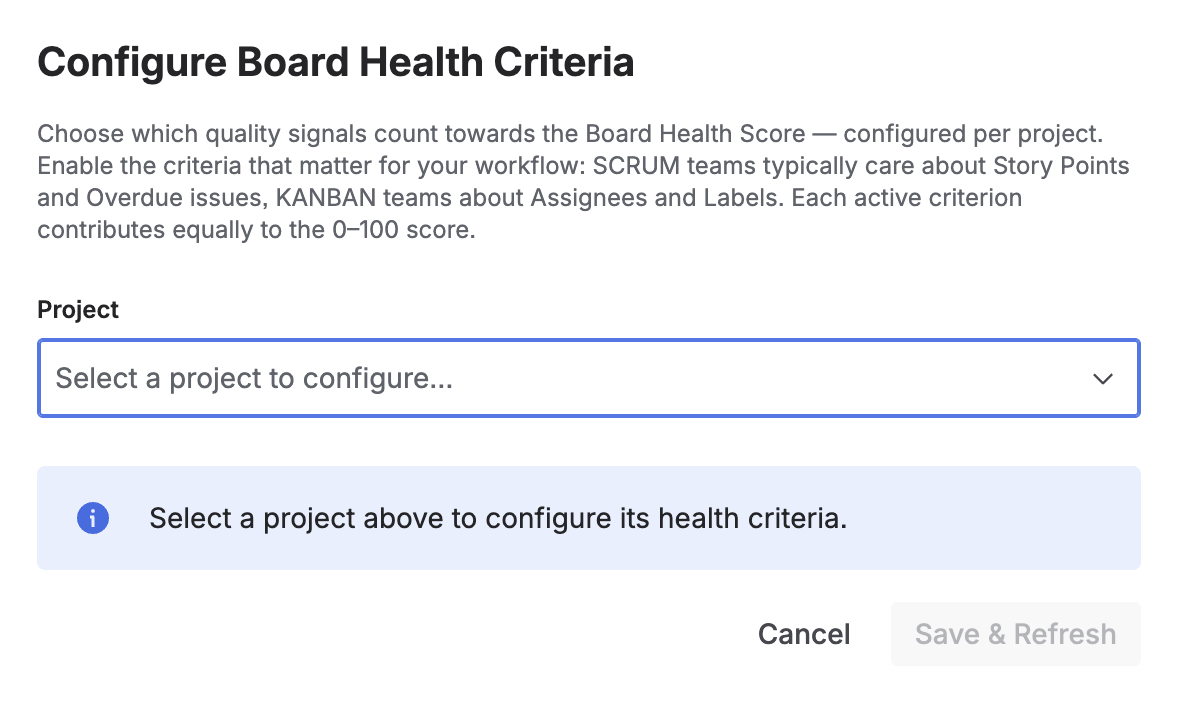
Step 1: Select the project to configure health criteria for — each project can have its own set of active signals
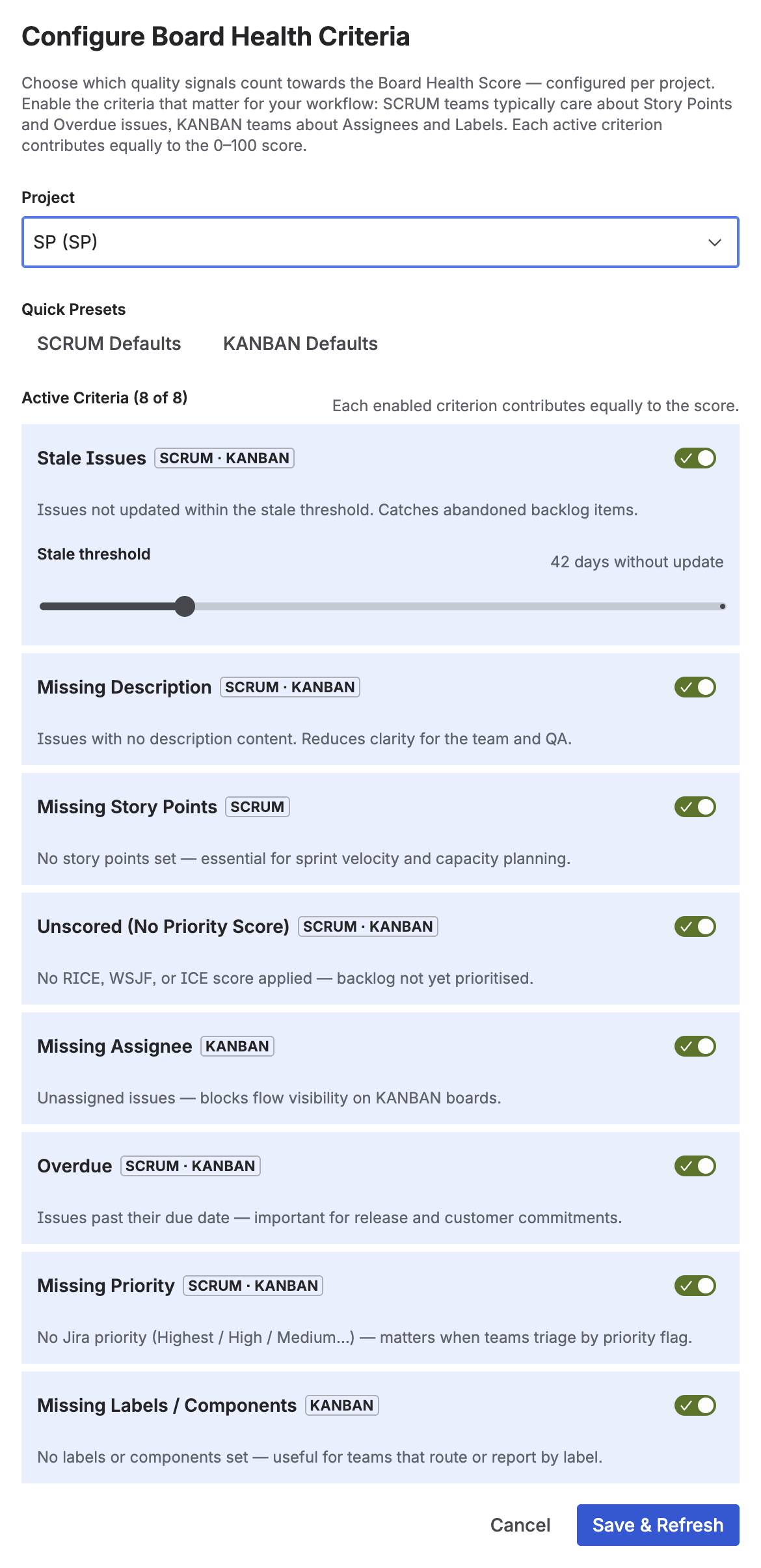
Step 2: Enable individual criteria, use Scrum or Kanban presets, and configure the stale threshold per project
Turning a score into action
A health score is useless if it doesn't change behaviour. The most effective way to use it is to bring the breakdown into your regular ceremonies:
In sprint retrospectives
Open the Board Health panel at the end of each sprint. If the score dropped during the sprint, identify which criterion is responsible. Often it's Unscored (new issues were created without RICE/WSJF scores) or Stale (issues were deprioritized mid-sprint but not deferred or closed). This takes two minutes and makes the "process" conversation concrete.
In backlog refinement sessions
Use the criterion breakdown to focus refinement energy. If Missing Descriptions is costing 12 points, spend the first 15 minutes of refinement adding acceptance criteria to the worst offenders. The Rovo AI Agent in Priority Scoring can also help: "Find issues needing attention in project CORE — missing description category" returns a filtered list immediately.
Across multiple projects
The Portfolio view in Priority Scoring shows a health score for every project in your Jira instance side by side. Engineering managers and VPs with 4–8 active teams can see at a glance which projects are healthy and which need a refinement intervention — without opening each project individually. See more: Portfolio Backlog Health in Jira.
Score cache note: The Board Health Score is cached for 1 hour to avoid repeated computation on large projects. When you apply a priority score via the app or the Rovo agent, the cache is invalidated automatically — you see the updated score immediately. After external changes (JQL bulk edits, imports), click "Refresh" to trigger a fresh calculation.
Frequently asked questions
What is Jira backlog health?
Jira backlog health is a measure of how well-maintained and sprint-ready your open issues are. A healthy backlog has issues with clear descriptions, story point estimates, assigned owners, up-to-date status, and a priority score. An unhealthy backlog accumulates stale issues, missing fields, and unscored items — making sprint planning harder and slowing the team down.
How do you measure backlog health in Jira?
You can measure it with a Board Health Score (0–100) that automatically checks all open issues against quality criteria: stale age, missing descriptions, missing story points, missing assignees, overdue dates, missing priority, missing labels, and missing scores. Priority Scoring for Jira calculates this score automatically with a per-criterion breakdown, configurable per project. No JQL or scripting needed.
What makes a Jira backlog unhealthy?
The most common causes: issues not updated in 30–90+ days (stale), issues without a description or acceptance criteria, missing story point estimates, no assignee, overdue items with missed deadlines, and issues never scored for priority. Each problem individually is manageable — combined across a 200-issue backlog they make sprint planning unreliable.
What is a stale issue in Jira?
A stale issue is one that has not been updated — no status change, comment, or field edit — for a configurable number of days. The threshold is typically 30–90 days. Stale issues represent work that is forgotten, blocked without being marked as such, or no longer relevant. In Priority Scoring for Jira, the stale threshold is configurable per project between 7 and 180 days.
Does Jira show a backlog health score natively?
No. Jira does not include an aggregated backlog or board health score out of the box. You can manually run JQL queries to find stale or incomplete issues, but there is no automatic score. Priority Scoring for Jira adds a Board Health Score with a per-criterion breakdown and a Jira Dashboard gadget, with no JQL or custom formula required.
How often should I check backlog health?
For Scrum teams, once per sprint — ideally at the retrospective. For Kanban teams, weekly or bi-weekly. The score is most useful as a trend: a rising score over four weeks confirms your refinement process is working. A sudden drop after a sprint is a signal to investigate what changed. The Board Health gadget on your Jira dashboard makes this a passive check rather than an active task.
See your Board Health Score in minutes
Priority Scoring for Jira calculates a 0–100 Board Health Score across 8 configurable criteria — broken down by criterion, configurable per project, with a Jira Dashboard gadget included. Free trial available.
Try it free on Marketplace →