Grooming vs. refinement — a quick note
The 2020 update to the Scrum Guide replaced "backlog grooming" with Product Backlog Refinement as the official term, and reframed it as an ongoing activity rather than a discrete ceremony. In practice, "backlog grooming" remains the widely used term you'll find in most Jira workflows, job postings, and team discussions — so this article uses both.
The Scrum Guide's guidance: refinement should consume no more than 10% of the team's sprint capacity. For a two-week sprint with a team of five, that's roughly four hours per sprint — less than an hour per person. If your refinement sessions regularly run longer, the checklist below usually points to why.
Definition of Ready (DoR): A shared agreement on the minimum conditions an issue must meet before it can enter a sprint. The 12 items below are a solid starting DoR for most Jira teams. Adapt the list to your context — a startup and an enterprise team will weight the items differently.
The 12-point Jira backlog grooming checklist
Each item is tagged by priority: Must items block sprint entry; Should items cause rework if skipped; Nice items improve quality over time but rarely block delivery.
| Check | What to verify | Priority | |
|---|---|---|---|
| ☐ | Clear title | Title describes what changes, not a vague label. "Add CSV export for filtered board view" is good; "CSV export" is not. | Must |
| ☐ | Description written | At minimum: background context, what the expected outcome is, and who benefits. A one-paragraph description prevents 20 minutes of clarification at sprint planning. | Must |
| ☐ | Acceptance criteria defined | Specific, testable conditions that determine "done." Format: "Given / When / Then" or bullet list. Without these, done is a judgment call — and judgment calls cause disagreements at sprint review. | Must |
| ☐ | Story points estimated | Team has agreed on a relative size. Unestimated stories make sprint capacity planning impossible. If the issue is too large to estimate, split it first. | Must |
| ☐ | Priority score set | A RICE, WSJF, or ICE score is present — not just a categorical "High / Medium / Low." Scores make prioritization decisions defensible and comparable across the backlog. | Must |
| ☐ | Assignee or team assigned | Either a specific person or a team label is set. Issues floating without an owner create ambiguity at sprint planning and delay triage when blockers arise. | Should |
| ☐ | Correct issue type | Story, Bug, Task, Epic — each has different DoD implications. A bug masquerading as a story skips root cause analysis. An epic that should be a story inflates the backlog artificially. | Should |
| ☐ | Labels and components applied | At least one label or component tag. This enables filtering, sprint planning by area, and reporting. Teams without labels can't answer "how much work is infrastructure vs. new features?" | Should |
| ☐ | Not stale | Issue has been updated within the last 90 days. Issues older than 90 days without activity should be questioned: is this still relevant? Should it be archived or deleted? | Should |
| ☐ | No duplicate | A quick search confirms there is no existing open issue for the same work. Duplicates fragment discussion, split votes, and waste estimation time on work that may already be in progress. | Should |
| ☐ | Dependencies linked | If this issue is blocked by or blocks another issue, the link is set in Jira. Unlinked dependencies are invisible in sprint planning and cause surprise blockers mid-sprint. | Nice |
| ☐ | Due date set (if applicable) | For compliance items, external commitments, or SLA-bound bugs: a due date is set and realistic. Not every issue needs one — but when one exists, it should be in Jira, not in someone's head. | Nice |
Using the checklist as a Definition of Ready
A Definition of Ready (DoR) is not a gate that slows teams down — it's a contract that speeds sprint planning up. When every item that enters the sprint meets the same minimum standard, planning becomes a logistics conversation ("who takes what") rather than a discovery session ("what is this even asking for?").
For most teams, the five Must items are the right minimum DoR. An issue without a description, acceptance criteria, or estimate should not enter a sprint — regardless of how urgent it feels. The time "saved" by skipping those in refinement gets paid back with interest during the sprint as engineers ask clarifying questions, re-open items, or discover mid-implementation that the scope was different from what they understood.
Item 5: why a priority score matters more than a label
The one checklist item that most teams skip — or implement incorrectly — is the priority score. Jira's built-in Priority field (Highest, High, Medium, Low, Lowest) gives you a category, not a score. Categories don't help when two issues are both "High": they tell you both matter, but not which one matters more.
A numeric priority score — from RICE, WSJF, or ICE — gives you a ranking. When sprint capacity runs short, the team doesn't negotiate: they look at the ranked list and pull from the top. That removes the largest source of friction in most sprint planning sessions.
If your team doesn't have a scoring framework yet, see the decision guide: RICE vs. WSJF vs. ICE — which framework is right for your team? ICE is the fastest to adopt and requires no analytics setup — a good entry point for teams starting from scratch.
Item 9: the stale issue problem
Stale issues are the most common backlog health problem — and the hardest to keep up with manually. An issue created 18 months ago in response to a feature request, updated once, and never closed — it's still in the backlog, occupying space in sprint planning discussions, and probably no longer relevant.
The 90-day threshold is a practical heuristic, not a hard rule. Some issues legitimately sit for longer — a compliance requirement waiting on legal approval, or a known limitation with a deferred fix date. What matters is that the issue has been intentionally kept, with an updated comment explaining why. An issue that's stale because nobody has looked at it in six months is a different thing from one that's intentionally deferred.
During refinement, run a JQL query to surface stale candidates:
project = PROJ AND status != Done AND updated <= -90d ORDER BY updated ASC
Work through this list from oldest to newest. For each issue: close it, update it with current context, or explicitly defer it with a comment explaining when to revisit.
From checklist to automated health score
Running through a 12-point checklist manually before every refinement session is a significant overhead on large backlogs. When a project has 150+ open issues, the checklist becomes something teams intend to use but rarely complete.
Priority Scoring for Jira turns this checklist into a live Board Health Score — a 0–100 number that reflects how well your backlog meets up to 8 configurable health criteria. Instead of checking 12 points manually, you see the score at a glance and drill into the breakdown to find which criteria are pulling it down.
The 8 health criteria map directly to checklist items:
- Missing Description → checklist item 2
- Missing Story Points → checklist item 4
- Unscored Issues → checklist item 5 (no priority score)
- Missing Assignee → checklist item 6
- Stale Issues → checklist item 9
- Missing Labels → checklist item 8
- Missing Priority → categorical priority field check
- Overdue Issues → checklist item 12
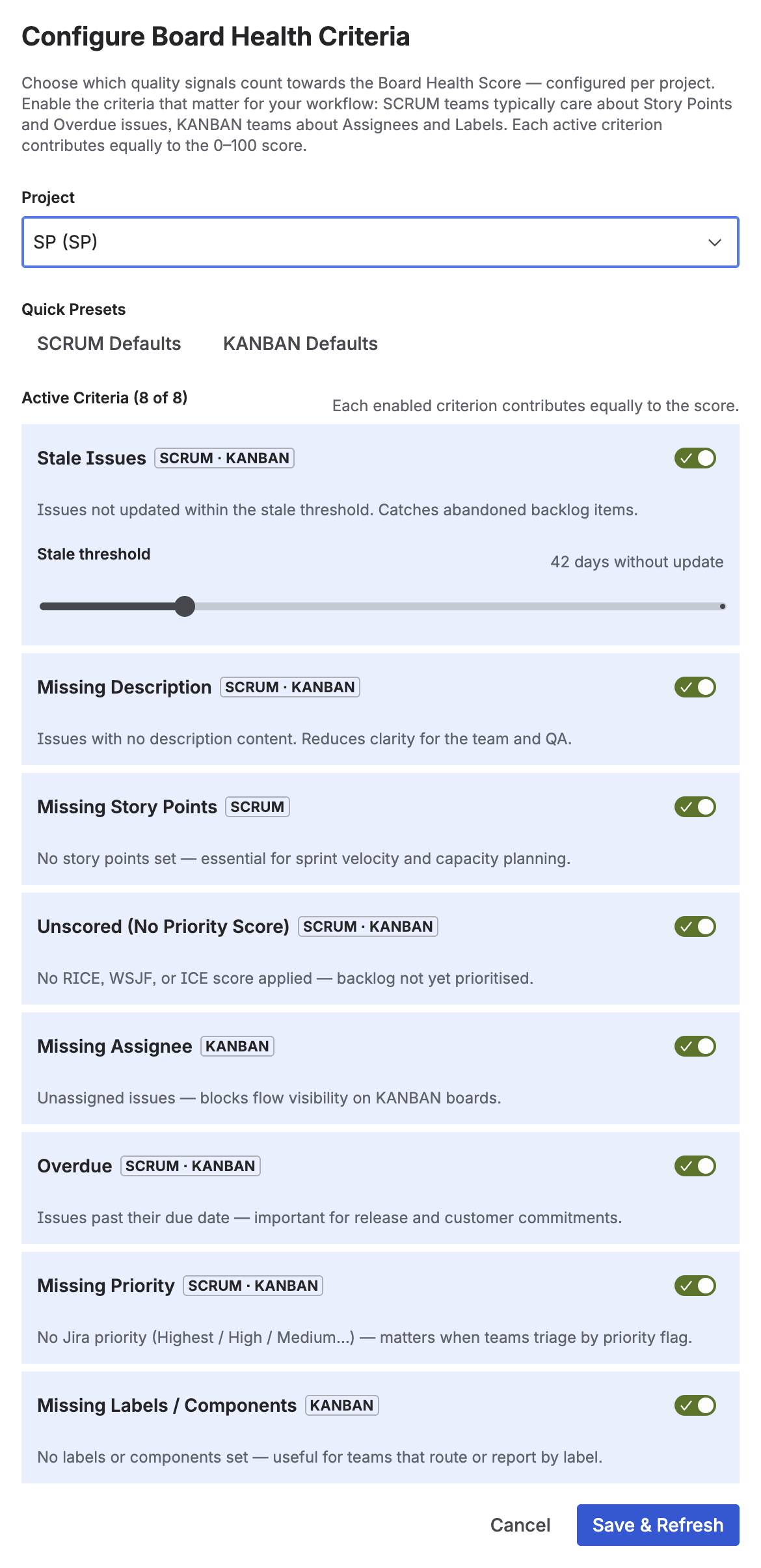
Board Health Score configuration — toggle each criterion on or off per project, with Scrum and Kanban presets
You can configure which criteria are active per project — so a Kanban project can disable the Story Points check, and a compliance-heavy project can weight the Overdue criterion more heavily. The score auto-updates as issues are edited; there's no manual refresh required.
How often to run refinement
The Scrum Guide (2020) treats refinement as an ongoing activity — not a once-per-sprint meeting. In practice, most teams find a rhythm that combines both:
- One mid-sprint refinement session (~60–90 minutes) — work through the top items in the backlog using the checklist, estimate unestimated stories, clean up stale items.
- Continuous async refinement — when new issues are created, the creator fills in description and acceptance criteria immediately. Labels and story points are added before the issue reaches the top of the backlog.
The Board Health Score gives you an objective signal of how well the continuous refinement is holding up. If the score drops sharply between sessions, it means new issues are being created without sufficient context — a process problem to address at the team level, not just a checklist problem.
Frequently asked questions
What is backlog grooming in Jira?
Backlog grooming — officially called Product Backlog Refinement in the 2020 Scrum Guide — is the process of reviewing and clarifying backlog items so they are ready for sprint planning. In Jira, this means ensuring each issue has a clear title, description, acceptance criteria, story point estimate, priority score, and no stale or duplicate entries. The Scrum Guide recommends no more than 10% of sprint capacity on refinement activities.
What should be on a backlog grooming checklist?
At minimum: clear title, description written, acceptance criteria defined, story points estimated, priority score set. Additional checks that prevent rework: assignee set, correct issue type, labels applied, no stale issues (90+ days without update), no duplicates. Nice-to-have: dependencies linked, due date set where applicable.
How often should you do backlog grooming?
The 2020 Scrum Guide treats refinement as an ongoing activity, not a fixed ceremony. Most teams combine one dedicated mid-sprint refinement session per sprint with continuous async refinement as new issues are created. Total refinement time should stay under 10% of sprint capacity. If sessions regularly run longer, the checklist above usually points to the underlying cause.
What is the difference between backlog grooming and sprint planning?
Grooming (refinement) prepares issues for future sprints — clarifying, estimating, and ordering. Sprint planning selects from the prepared backlog and commits to a sprint goal. Grooming should happen throughout the sprint so that sprint planning can focus on selection and commitment, not on discovering what tickets actually mean.
How can I automate backlog health checks in Jira?
Priority Scoring for Jira includes a Board Health Score (0–100) that automatically monitors your backlog against 8 configurable criteria — missing descriptions, missing story points, stale issues, unscored items, missing assignees, overdue issues, missing priority, and missing labels. It updates automatically as issues change, so you always have a live reading without running through a checklist by hand. See more: Jira Backlog Health: Measure Your Project Quality Score.
Automate this checklist with a live Board Health Score
Priority Scoring for Jira checks your backlog against 8 health criteria automatically — so your refinement sessions can focus on decisions, not chasing missing fields.
Try it free on Marketplace →