The multi-project visibility problem
Jira is built around individual projects. The backlog view, the board, the sprint — all scoped to one project at a time. For a single Scrum team, that's exactly right. For an engineering manager overseeing five teams, or a VP reviewing eight squads before a quarterly planning session, it's a navigation problem masquerading as a visibility problem.
The typical workaround: open each project in turn, scan the backlog, check recent activity, close the tab, open the next project. Five projects × ten minutes = fifty minutes of low-quality review that still misses the issues nobody thought to flag. By the time a chronic problem surfaces — a backlog where half the stories have no acceptance criteria, or a project where unscored tickets have been accumulating for two sprints — it's already costing the team.
Quick answer: Priority Scoring for Jira includes a Portfolio view that shows a Board Health Score (0–100) per project alongside issue counts and a per-criterion breakdown — all in one page, without navigating into individual projects. The score updates automatically as issues are edited.
What the Board Health Score measures
The Board Health Score is a 0–100 metric for a single Jira project. It aggregates up to 8 configurable criteria — each one representing a quality signal that affects how smoothly a backlog moves through sprints. Each active criterion contributes equally to the score: a project with 4 active criteria and no violations scores 100; one active criterion with 50% of issues failing it contributes 12.5 points to the deficit.
| Criterion | What it checks | Default: Scrum | Default: Kanban | |
|---|---|---|---|---|
| 📝 | Missing Description | Issue has no description text | ✅ On | ✅ On |
| 📐 | Missing Story Points | Story point field is empty | ✅ On | ❌ Off |
| 🎯 | Unscored Issues | No priority score set (RICE/WSJF/ICE) | ✅ On | ✅ On |
| 👤 | Missing Assignee | Issue has no assignee | ✅ On | ✅ On |
| 🕰️ | Stale Issues | No update in 90+ days | ✅ On | ✅ On |
| ⏰ | Overdue Issues | Due date is in the past | ✅ On | ✅ On |
| 🏷️ | Missing Priority | Categorical priority field (High/Medium/Low) not set | ✅ On | ❌ Off |
| 🔖 | Missing Labels | No labels applied | ❌ Off | ❌ Off |
Each criterion can be toggled per project. A frontend team that doesn't use story points can disable that check without affecting the scoring logic for other projects. The Scrum and Kanban presets apply sensible defaults for the most common workflows — you can override them per project.
The portfolio view across multiple projects
The portfolio view in Priority Scoring aggregates Board Health Scores across multiple projects onto a single page. Each project appears as a row. Here's what the view looks like for a team managing six Jira projects:
The Data & Analytics project (score 51) stands out immediately — a red flag visible without opening the project. The Integrations project at 67 is borderline. Platform at 88 and Mobile at 91 need no action. This took seconds to read. The equivalent manual review would have taken 30–40 minutes.
Drilling into the red project
Clicking into the DATA project expands the criterion breakdown — which of the 8 checks are failing, and by how much:
- Unscored Issues: 38 of 89 open issues (43%) have no priority score. This is the largest contributor to the low health score.
- Stale Issues: 14 issues (16%) have not been updated in 90+ days — classic backlog zombie tickets.
- Missing Description: 9 issues (10%) have no description at all.
- Missing Assignee: 6 issues (7%) are unowned.
- Missing Story Points: 4 issues (4%) — mostly epics, acceptable.
- Overdue, Missing Priority, Missing Labels: all green (0 violations).
That breakdown produces a concrete remediation agenda: start with the 38 unscored issues (use Rovo AI to bulk-score them), then work through the 14 stale issues (close or update them), then fill in descriptions for the 9 bare issues. Three actions, clear order, no ambiguity.
For 1-on-1s: The portfolio health score gives engineering managers a neutral, data-driven starting point for team health conversations. "Your project is at 51 — the main driver is 38 unscored issues and 14 stale tickets" is a more productive opener than "I noticed some backlog problems last week."
The portfolio view in Priority Scoring
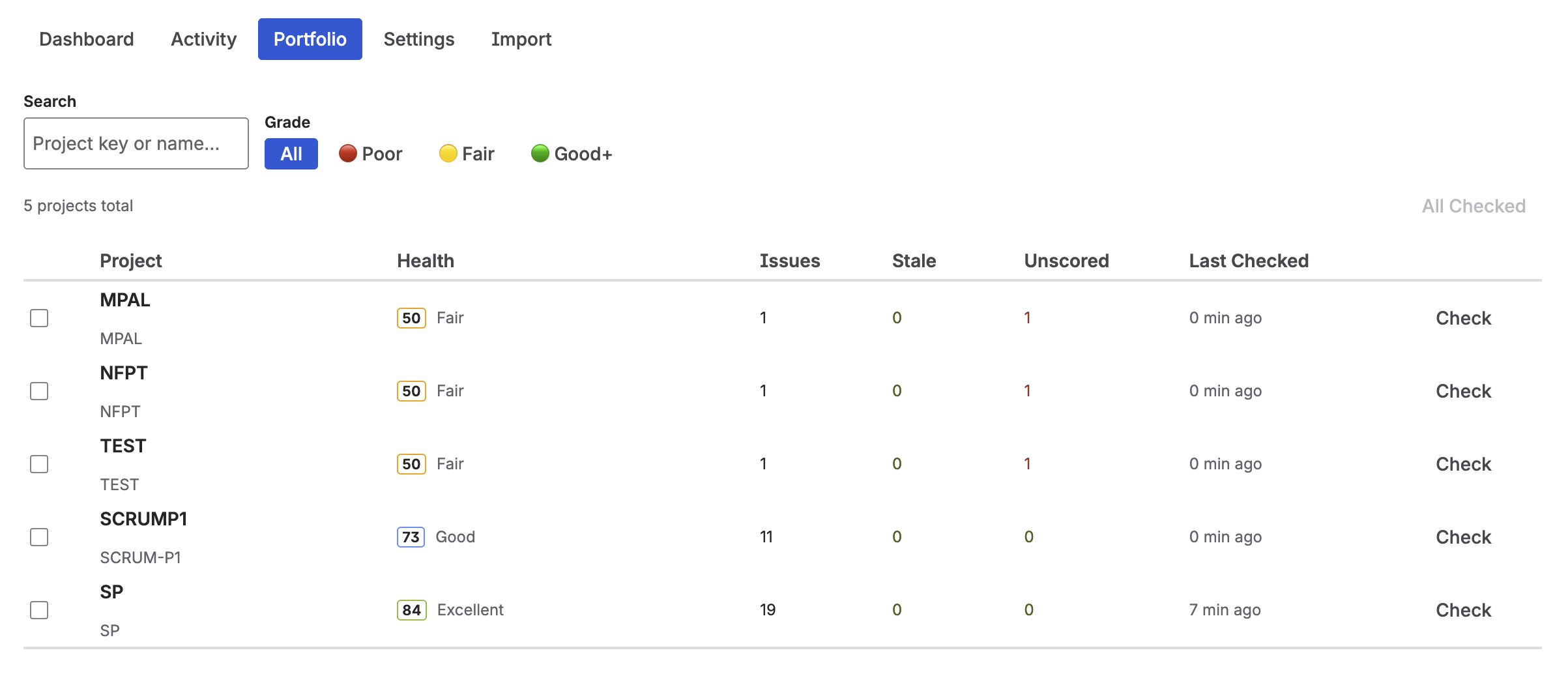
Portfolio view — Board Health Scores across multiple Jira projects, with per-project breakdown
How frequently to review portfolio health
The Board Health Score is cached for up to one hour per project, and the cache is invalidated whenever an issue in that project is edited. In practice, the score reflects the current state of the backlog within minutes of any change — there's no need to manually trigger a refresh.
Useful review cadences by role:
- Engineering Manager: Check the portfolio view once per sprint during sprint planning prep. A score that drops significantly between sprints signals a team that's been creating issues without completing them or maintaining quality.
- VP of Engineering / CTO: Weekly or before each quarterly planning cycle. The portfolio view provides a factual health baseline when discussing resourcing, team capacity, or technical debt investments.
- Scrum Master: Monitor the score for their team's project continuously and use it as a pre-refinement checklist anchor. See the backlog grooming checklist for how the 8 criteria map to the 12-point DoR.
Setting up portfolio health monitoring
-
1Install Priority Scoring for Jira from the Atlassian Marketplace. The portfolio view and Board Health Score are included. A free trial with all features is available.
-
2Open Priority Scoring and navigate to the Board Health section. Select the first project you want to monitor. The health score calculates automatically on first load.
-
3Configure the active criteria per project. For each project, choose the Scrum or Kanban preset as a starting point, then toggle individual criteria on or off as needed. A Kanban project that doesn't use story points should have that criterion disabled — otherwise the score will permanently penalize a non-issue.
-
4Switch to the Portfolio tab to see all projects at once. All projects where you have configured health criteria appear as rows in the portfolio view. The scores are live — no manual refresh needed.
-
5Drill into red and yellow projects to get the criterion breakdown. Click any project row to expand the breakdown. Use the breakdown to prioritize remediation: address the criterion with the highest failure rate first.
Beyond health: priority scores across the portfolio
The portfolio view in Priority Scoring also shows the priority ranking for each project — not just health. An engineering manager can see, for any project, which issues are currently scored highest by RICE, WSJF, or ICE, without switching project context. This matters when capacity decisions cut across teams: if the Data project has a RICE score of 480 on a critical analytics Feature and the Platform project has a WSJF score of 4.8 on a dependent enabler, both signals are visible in one place.
For more on each scoring framework: RICE · WSJF · ICE · comparison guide.
Frequently asked questions
Can Jira show backlog health across multiple projects at once?
Not natively. Jira Cloud doesn't include a cross-project health metric. Priority Scoring for Jira adds a Portfolio view that shows a Board Health Score (0–100) per project side by side — so you can see at a glance which projects need attention without opening each one individually.
What is a Board Health Score in Jira?
A 0–100 metric that measures how well a Jira project's backlog meets a set of quality criteria — missing descriptions, missing story points, unscored issues, stale issues (90+ days without update), missing assignees, overdue items, missing priority field, and missing labels. Each active criterion contributes equally. The score updates automatically as issues are edited. See the full breakdown: Jira Backlog Health: Measure Your Project Quality Score.
How many projects can I track in the portfolio view?
There is no fixed project limit. You select which projects to include in the portfolio. Each project appears as a row with its Board Health Score and criterion breakdown. Performance is best with up to 20–30 projects per portfolio view.
What criteria does the Board Health Score check?
Up to 8 criteria: Missing Description, Missing Story Points, Unscored Issues (no RICE/WSJF/ICE score), Missing Assignee, Stale Issues, Overdue Issues, Missing Priority (categorical field), and Missing Labels. Each can be toggled per project. Scrum and Kanban presets apply sensible defaults.
How often does the Board Health Score update?
The score is cached for up to one hour per project. Editing any issue in the project invalidates the cache and triggers a fresh calculation on the next request — so the score reflects recent changes within minutes of an issue being updated.
See the health of every project in one view
Priority Scoring for Jira adds a portfolio view with Board Health Scores across all your Jira projects — plus RICE, WSJF, and ICE scoring, Rovo AI, and a dashboard gadget. Free trial included.
Try it free on Marketplace →