The problem with one-size-fits-all scoring
RICE scoring was designed at Intercom for a specific type of product team: consumer-facing, high-reach, data-rich. The formula works beautifully in that context. But most teams aren't Intercom.
A B2B enterprise product team might have 30 customers — each paying €50,000 per year. For them, Reach (number of users) tells almost nothing. A feature that affects all 30 customers deeply is worth more than a feature touching 5,000 end users barely at all. Yet standard RICE would rank the high-reach feature first every time.
A platform engineering team has the opposite problem. They work on reliability, performance, and tooling — with near-zero direct user reach but enormous downstream Impact. Standard ICE's Ease dimension may not reflect what "easy" means when you're refactoring infrastructure.
Dimension weights solve this. They let you tell the scoring system: "For our team, Impact matters three times more than Reach." The formula stays the same. The relative importance of each factor changes.
Quick answer: In Priority Scoring for Jira, you set a weight multiplier (×1–×5) for each RICE, WSJF, or ICE dimension in Settings. All scores update automatically. No scripting, no custom Automation rules, no spreadsheets.
What dimension weights actually do
A weight multiplier amplifies a dimension's influence on the final score. A weight of ×1 is neutral — the dimension contributes at full face value. A weight of ×3 triples that dimension's contribution relative to a ×1 dimension. A weight of ×5 makes it the dominant factor in the formula.
The underlying RICE formula doesn't change — it's still (Reach × Impact × Confidence) ÷ Effort. But before those values are multiplied together, each raw dimension value is scaled by its weight. So if Impact carries a ×3 weight and Reach a ×1 weight, a feature with high Impact will always rank significantly above a feature with equivalent Reach but lower Impact.
This matters most when you're comparing scores across issues. The absolute number shifts — but the relative ranking is what you act on.
Two weight profiles for two very different teams
Profile 1 — B2B enterprise team
A team selling workflow software to enterprise customers. Deals are large, users are power users, and customer satisfaction is the primary driver of renewals.
This profile means a feature that deeply transforms a core enterprise workflow will score much higher than a minor UX tweak that touches many people superficially — even if the UX tweak reaches more users in absolute numbers.
Profile 2 — High-velocity growth team
A startup running weekly product experiments. The team values speed and learning. Confidence is intentionally discounted because they ship to learn, not to be certain. Ease (the equivalent of low Effort) is rewarded.
The same issue scored under both profiles will produce dramatically different rankings — which is the point. Scoring should reflect your team's strategy, not a generic framework invented for a company with a different context.
Common mistake: Setting all weights to ×5. This is equivalent to no weighting at all — every dimension is equally amplified, so the ranking doesn't change. Weights only have meaning relative to each other. If one dimension is ×4, at least one other should be ×1 or ×2.
Custom weights for WSJF and ICE
The same weight system applies to WSJF and ICE. For WSJF, the three Cost of Delay sub-dimensions — Business Value, Time Criticality, and Risk Reduction — each carry a weight. An org doing PI Planning where regulatory deadlines dominate might weight Time Criticality at ×4. A platform team focused on technical risk might weight Risk Reduction at ×3.
For ICE, teams sometimes flip the default assumption about Ease. Standard ICE gives equal weight to Impact, Confidence, and Ease. A team deliberately working on technically hard problems — where Ease is almost always low — might reduce Ease's weight so that hard-but-high-impact work isn't unfairly penalized.
How to configure dimension weights in Jira
In Priority Scoring for Jira, weights are configured per project, per framework. You can run RICE with one weight profile in your product backlog and a different profile in an infrastructure project — the scores remain comparable within each project.
-
1Open Priority Scoring Settings. Navigate to the Priority Scoring global configuration page and select your project from the dropdown.
-
2Choose your framework. Select RICE, WSJF, or ICE from the framework tabs. Each has its own independent weight configuration.
-
3Set weight multipliers for each dimension. Use the weight selectors (×1–×5) to adjust the influence of each dimension. The preview section shows you an example score calculation with your current weights applied.
-
4Save the configuration. All existing scores in your project are recalculated automatically. Open the Priority Scoring dashboard to see how the ranking has shifted.
-
5Communicate the change to your team. When weights change, a previously top-ranked issue may drop significantly. Brief your team so the recalculation doesn't create confusion during a sprint planning meeting.
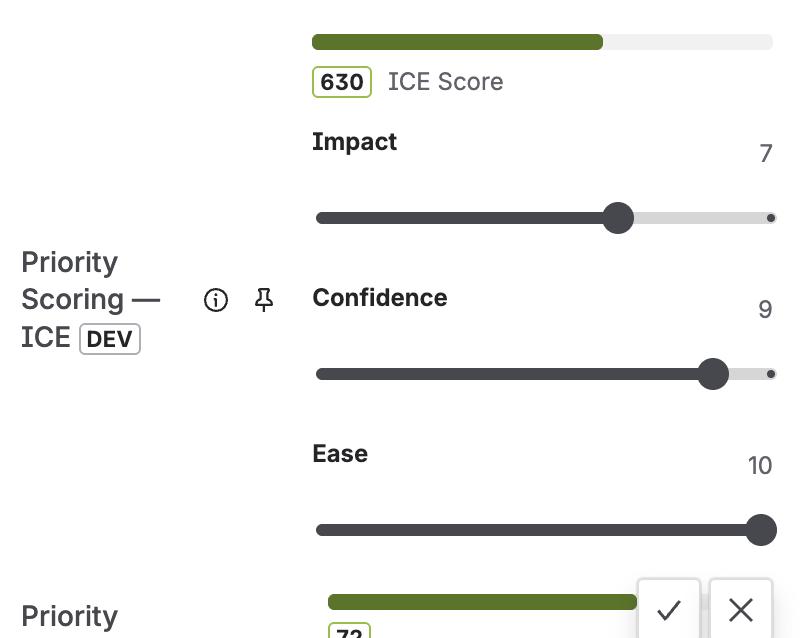
Dimension weight configuration in Priority Scoring for Jira — weight multipliers per framework, recalculates all scores instantly
The live-preview score on each issue
When a team member sets or adjusts dimension values on a Jira issue, the score is recalculated live — before they save. This matters because it makes the weight system transparent. The person scoring can see: "If I rate Impact as High, the score jumps from 42 to 85. That's because Impact carries a ×4 weight in our framework."
Live preview has a secondary benefit: it discourages inflation. When scorers can see the direct effect of each slider position, they're more thoughtful about their estimates. Marking everything "High Impact" becomes obviously unhelpful when the live score on low-Impact issues drops to near zero.
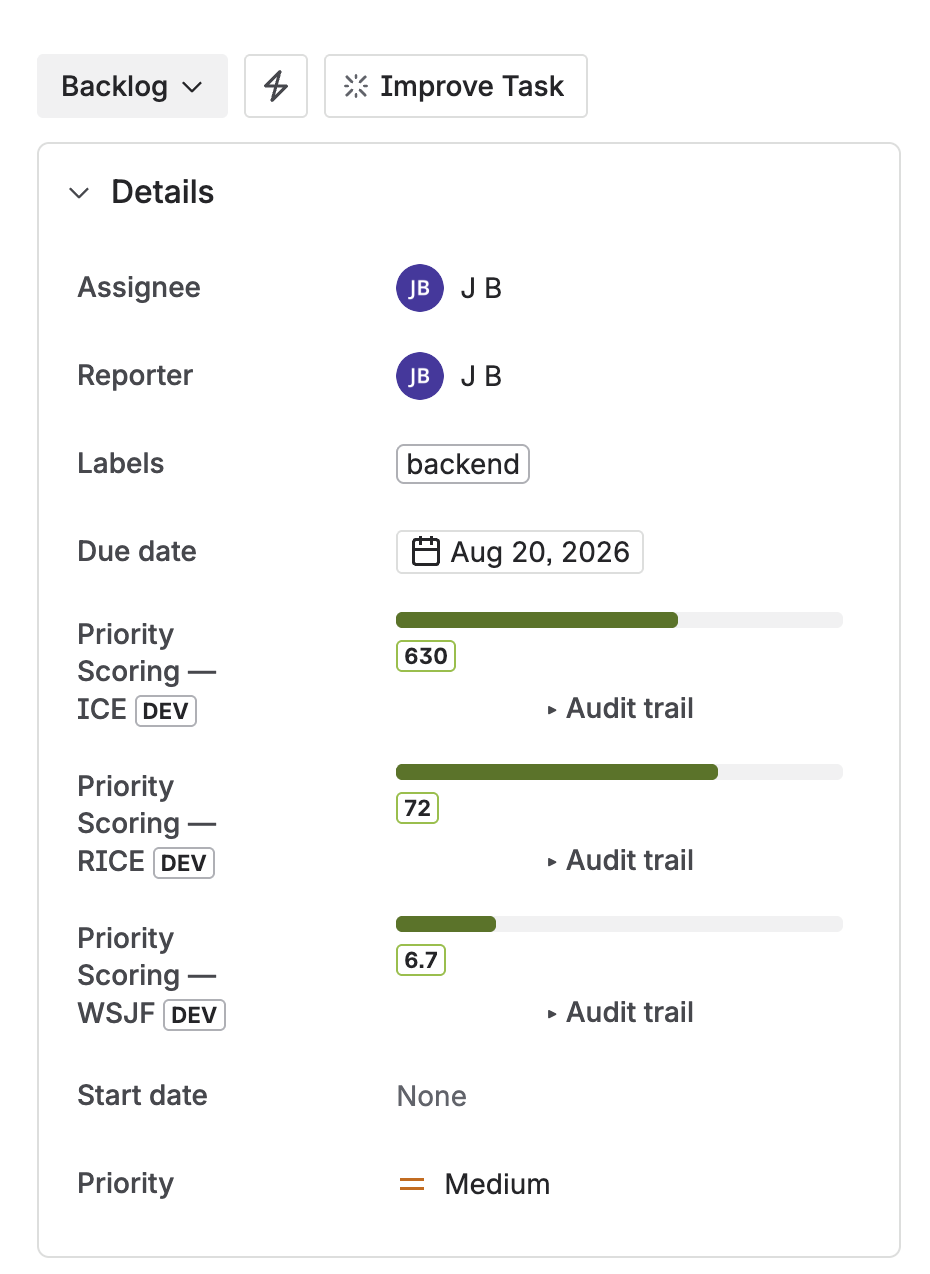
Custom weight profiles are reflected in the live score display on every Jira issue
Tracking weight changes over time
Changing dimension weights after your team has been scoring for several months is a significant event. The entire backlog ranking will shift. Priority Scoring for Jira logs weight changes in the Score Audit Trail alongside individual score edits. You can see when a weight change happened, what the values were before and after, and which issues were most affected.
This is especially useful for retrospectives. If the team suspects that the current weight profile isn't producing useful rankings — maybe high-scoring items keep getting deprioritized in planning — the audit trail lets you trace when the weights were last reviewed and whether the scoring behavior changed meaningfully.
For a broader view of how your scoring is contributing to backlog quality, see the Jira Backlog Health Score — which combines scoring completeness, stale issues, and missing fields into a single 0–100 project quality indicator.
When to revisit your weight profile
Weight profiles aren't set-and-forget. A few signals that your current weights may be off:
- High-scoring issues consistently get deprioritized in sprint planning. If the team keeps overriding the ranked order, the weights may not reflect the decisions they're actually making.
- Scores cluster too tightly. If 80% of your backlog has scores within a narrow band, consider amplifying the weight on the dimension where you see the most real-world variation.
- Team strategy has shifted. If you moved from growth mode to reliability mode, Reach should probably carry less weight than Confidence. Update the profile to reflect the new direction.
- Onboarding new team members. A weight calibration session during onboarding helps new PMs understand the team's priorities explicitly — not just implicitly through backlog observation.
Frequently asked questions
Can I customize RICE scoring weights in Jira?
Yes. Priority Scoring for Jira lets you set a weight multiplier (×1–×5) for each RICE dimension. The weights are configured in Settings, apply per project and per framework, and recalculate all existing scores automatically when saved.
What is a weighted RICE score?
A weighted RICE score applies a custom multiplier to each dimension before calculating the final score. Instead of treating Reach, Impact, Confidence, and Effort as equally important, you define which dimensions matter most for your team's context. The formula structure stays the same — only the relative influence of each dimension changes.
What is the difference between RICE and weighted scoring?
Standard RICE applies equal weight to all four dimensions. Weighted scoring adds a multiplier (×1–×5) so strategically important factors have greater influence on the result. Both use the same four dimensions; weighted scoring makes the team's priorities explicit rather than assumed.
How do I set dimension weights in Jira without scripting?
In Priority Scoring for Jira, open Settings → Framework Configuration, select RICE, WSJF, or ICE, and use the weight selectors for each dimension. No ScriptRunner, no Automation rules, no formula maintenance required.
Should I use the same dimension weights for all my Jira projects?
Not necessarily. Priority Scoring for Jira allows per-project weight configuration. A growth-focused product project and an infrastructure reliability project have very different strategic priorities. Using the same weights across both would produce misleading cross-project comparisons. See the portfolio backlog health guide for how to compare projects that use different scoring profiles.
Tune your scoring formula — no spreadsheets, no scripting
Priority Scoring for Jira — RICE, WSJF, ICE with custom dimension weights, Rovo AI agent, Board Health score, and Portfolio view. Free trial included.
Try it free on Marketplace →