The "everything is P1" problem
Jira ships with a Priority field containing five levels: Highest, High, Medium, Low, Lowest. In most teams, issues accumulate at the top within months. Stakeholders mark their requests "High" by default. PMs mark engineering issues "High" to compete for sprint slots. The level inflates until it's meaningless.
The result: sprint planning becomes a negotiation where the loudest voice wins. Engineers don't know which ticket to pull when two "High" issues are waiting. Leadership can't see any ordering rationale in the backlog. And when something slips, nobody can articulate why issue A was prioritized over issue B — because there was no real rationale, just opinions.
The fix is not a new process or a new meeting. It's a number. A single numeric score — calculated from objective dimensions — creates a natural ranking that everyone can see and that requires no meeting to interpret.
Quick answer: Jira does not natively sort the backlog by a numeric priority score. Priority Scoring for Jira adds RICE, WSJF, and ICE scoring to every issue and displays a Priority Ranking table — sorted descending by score, with sprint, due date, and assignee columns — that shows your ranked backlog at a glance.
Categorical priority vs. numeric ranking
The fundamental problem with High/Medium/Low is that it's categorical. Two issues can both be "High" and the label gives you no way to compare them. Categorical fields answer "is this important?" but not "is this more important than that?"
Numeric scoring answers the comparative question. A RICE score of 240 ranks above 180 — no discussion required. The score is derived from specific inputs (Reach, Impact, Confidence, Effort), which means the ranking is auditable. You can look at issue A's score and say: "It scores higher because it reaches three times as many users for half the effort." That's a defensible rationale, not a gut feeling.
| Approach | Answers "important?" | Answers "more important than?" | Auditable | Scales to large backlogs |
|---|---|---|---|---|
| High/Medium/Low | Yes | No | No | No — inflates over time |
| Manual rank (drag-and-drop) | Yes | Yes — but subjective | No | No — needs constant maintenance |
| Numeric scoring (RICE/WSJF/ICE) | Yes | Yes — objective | Yes | Yes — scores update as backlog grows |
The Priority Ranking table
In Priority Scoring for Jira, the dashboard's Ranking tab shows all scored issues in descending score order. Each row displays the rank position, score with color badge, issue key, summary, sprint, due date, and assignee. Filtering by sprint, assignee, or label narrows the view to the relevant subset.
Example Priority Ranking table — scores sorted descending, color badges reflect configured thresholds
Issues at the bottom of the ranking — especially those with a 🔴 badge — are the ones to question. Should they be in the backlog at all? The ranking surfaces this conversation in a way that a backlog of "High" tickets never does.
Due-date flags and overdue detection
Score alone doesn't always capture urgency. A low-scoring issue with a hard deadline next week should still get attention. The ranking table displays the due date column and highlights overdue issues — so time-sensitive work is never buried under high-scoring but less urgent items.
The combination of score and due-date creates a two-axis view: what is most valuable, and what is most urgent. The ranking table lets you see both at once, rather than toggling between a sorted score view and a calendar view.
Bulk-score your backlog in minutes with Rovo
The biggest barrier to a ranked backlog is scoring every existing issue. If you have 150 issues and none are scored, the ranking table is empty. The Rovo AI agent in Priority Scoring can read each issue's summary, description, and acceptance criteria and suggest dimension values — so you can populate scores across the backlog without filling in 600 individual sliders.
In auto mode: "Score all unscored issues in project PROJ with RICE." Rovo works through the list, reasons through each issue, and writes the scores. The resulting ranking is a starting point — review the bottom and top before your next sprint planning session, and adjust any scores that feel off.
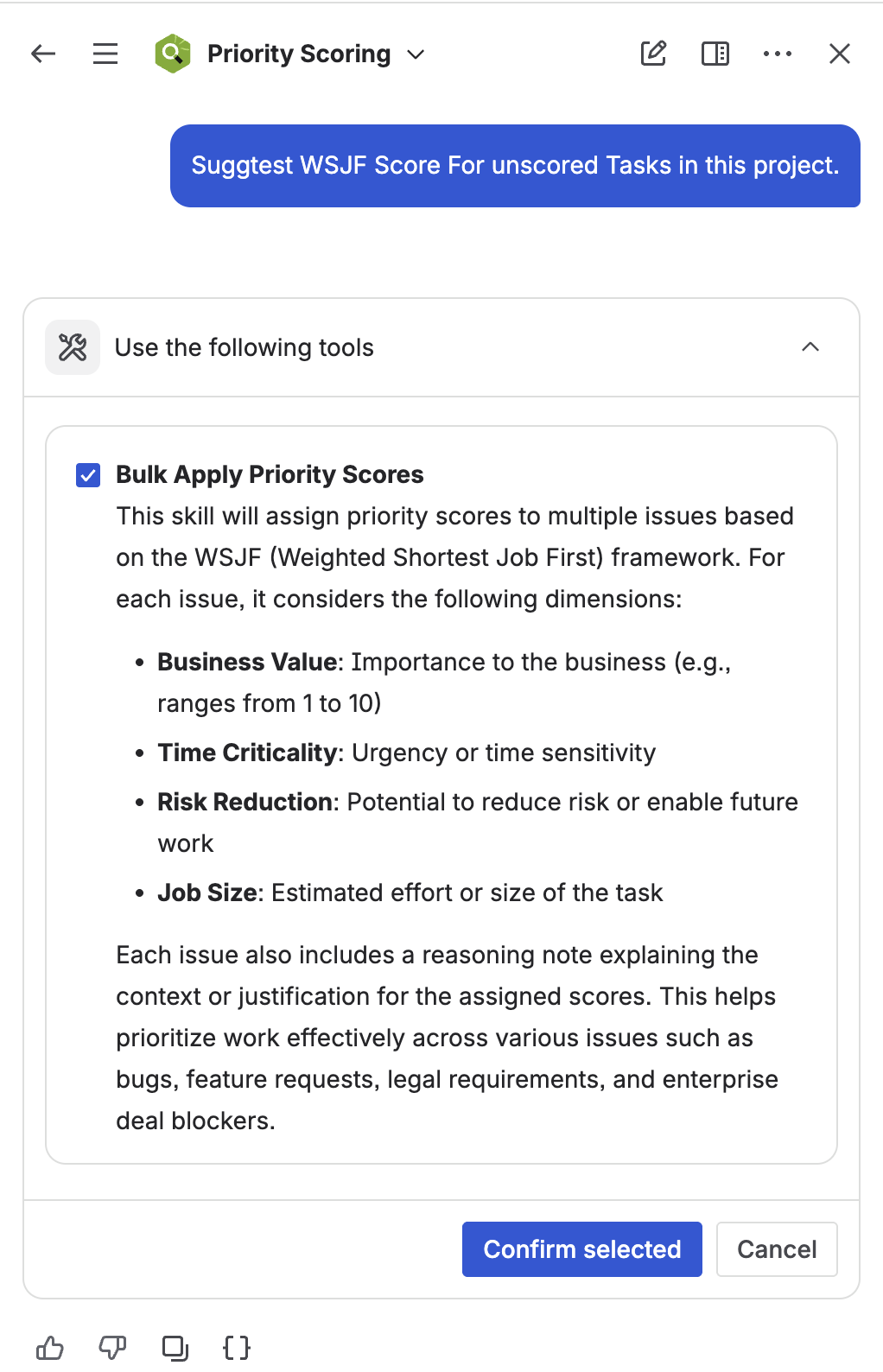
Rovo AI agent bulk-scoring unscored issues in a project — the fastest way to populate a ranked backlog from scratch
Adding priority ranking to your Jira dashboard
The Priority Scoring ranking table is also available as a Jira dashboard gadget. Add it to your project dashboard so the ranked backlog is visible to the whole team without navigating to a separate app page.
For engineering managers overseeing multiple projects, the portfolio view shows ranking and health across all projects simultaneously — see the portfolio backlog health guide for setup details.
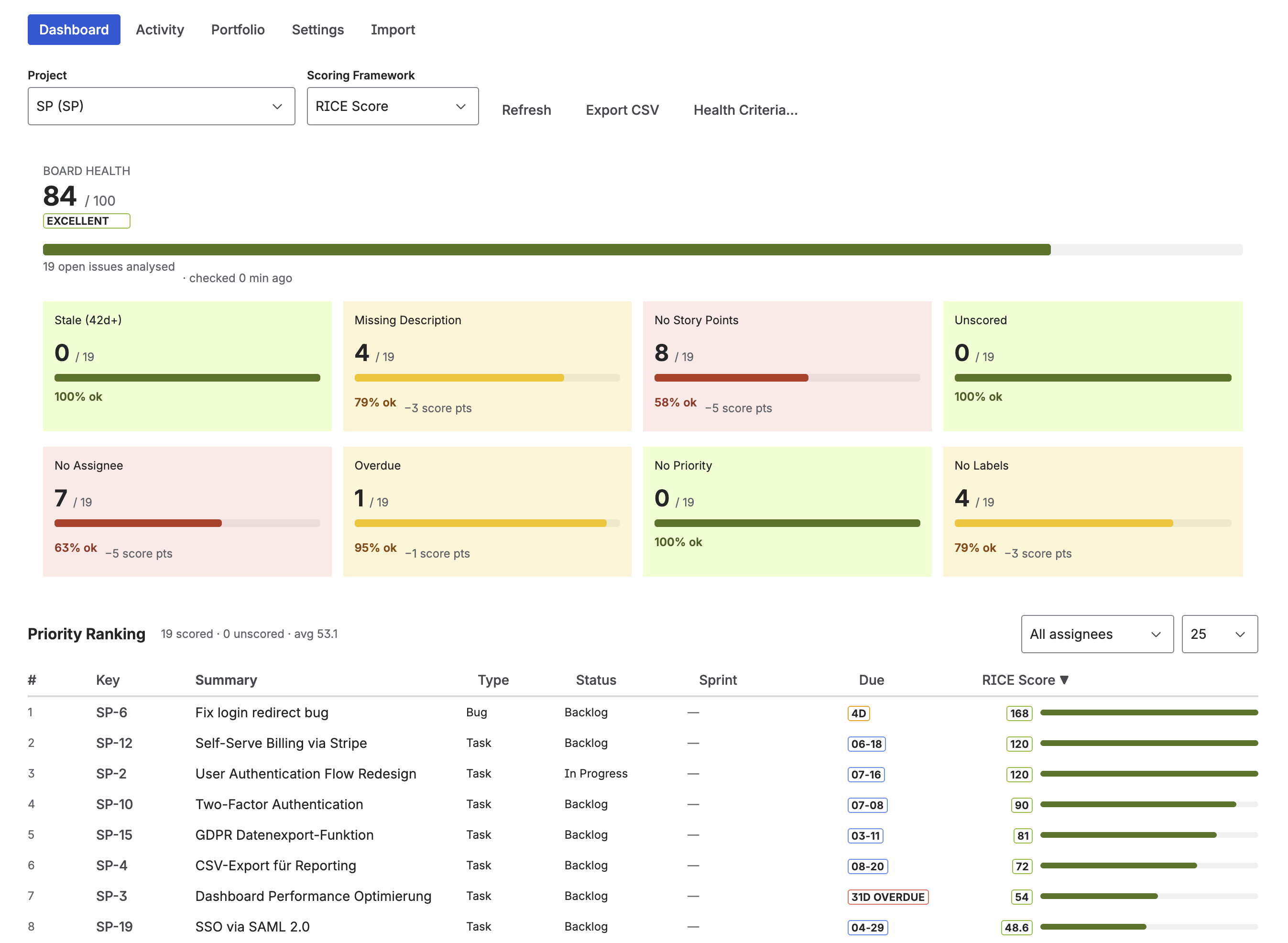
Priority Scoring dashboard — full ranking table with scores, sprint assignment, due dates, and Board Health panel
Getting your ranked backlog in five minutes
-
1Install Priority Scoring from the Atlassian Marketplace. Search "Priority Scoring" and install to your Jira Cloud site. Free trial includes all features.
-
2Score your first 10 issues. Open issues one by one and set RICE values with the sliders — Reach, Impact, Confidence, Effort. The score appears immediately. Or use the Rovo agent to bulk-score all unscored issues if you prefer AI-suggested values as a starting point.
-
3Open the Priority Scoring dashboard. Navigate to the Priority Scoring global page, select your project, and click the Ranking tab. Your scored issues appear sorted by score descending.
-
4Configure score thresholds. In Settings, set a Low and High threshold for your framework. Issues below the low threshold show 🔴; above the high threshold show 🟢. This makes the ranking immediately readable without studying individual numbers.
-
5Use the ranking in sprint planning. Open the Ranking tab before planning and work top-down. Issues at the bottom of the list are candidates for removal from the backlog. Check the backlog grooming checklist for the full 12-point review.
Tip: Don't aim for 100% scoring coverage before your first ranked planning session. Score the top 30–40 issues, run one planning meeting with the ranking visible, and let the team experience the difference. Coverage increases naturally when the ranking becomes useful.
Frequently asked questions
How do I rank issues in Jira by priority score?
Jira's native backlog sorts by drag-and-drop rank, not by a numeric score. Priority Scoring for Jira adds a separate Priority Ranking table — sorted descending by RICE, WSJF, or ICE score — outside the native backlog. Both views coexist; the ranking table doesn't change your backlog's native Rank field.
What is the difference between Jira rank and priority?
Jira rank is a manual ordering (drag-and-drop) within the backlog. Jira priority is a categorical label (High/Medium/Low). Neither is a numeric score. True priority ranking based on RICE, WSJF, or ICE requires an app that calculates and displays numeric scores per issue.
Can Jira automatically sort the backlog by priority?
Not natively. Changing the backlog's sort to Priority (Highest/High/Medium) disables drag-and-drop. Priority Scoring for Jira provides a separate ranking table sorted by numeric score — without modifying the backlog's native ordering.
How do I get rid of the "everything is high priority" problem in Jira?
Replace subjective "High" labels with a numeric scoring framework. RICE forces a quantitative comparison using Reach, Impact, Confidence, and Effort. Two issues can both be important — RICE produces a number showing which one delivers more value per unit of work. See RICE vs. WSJF vs. ICE to pick the right framework for your team.
What does the Priority Ranking table show?
The Priority Ranking table in Priority Scoring for Jira shows all scored issues sorted descending by score. Columns include rank, score (color-coded), issue key, summary, current sprint, due date, and assignee. Issues below the low threshold have a 🔴 badge; issues above the high threshold have 🟢. The table is filterable by sprint, assignee, and label.
See your ranked backlog in 5 minutes
Priority Scoring for Jira — RICE, WSJF, and ICE scoring, Priority Ranking table, Rovo AI agent, Board Health score, and Portfolio view. Free trial included.
Try it free on Marketplace →